Android from the foundation · Puzzle 19 · 20 of 20
When the process is gone
In puzzle 18, the ViewModel survived turning the phone, but it still lives in your process. Here's what's left when the process itself is ended, and where it waits.
The problem
In puzzle 18, the ViewModel survived turning the phone, because it waited in your process. In puzzle 12, you saw that when memory runs short, Android ends the processes of apps in the background. The user typed half a message, switched to another app for a minute, and came back. The process is gone, and with it every object it held, ViewModels included. Is the message lost?
See it
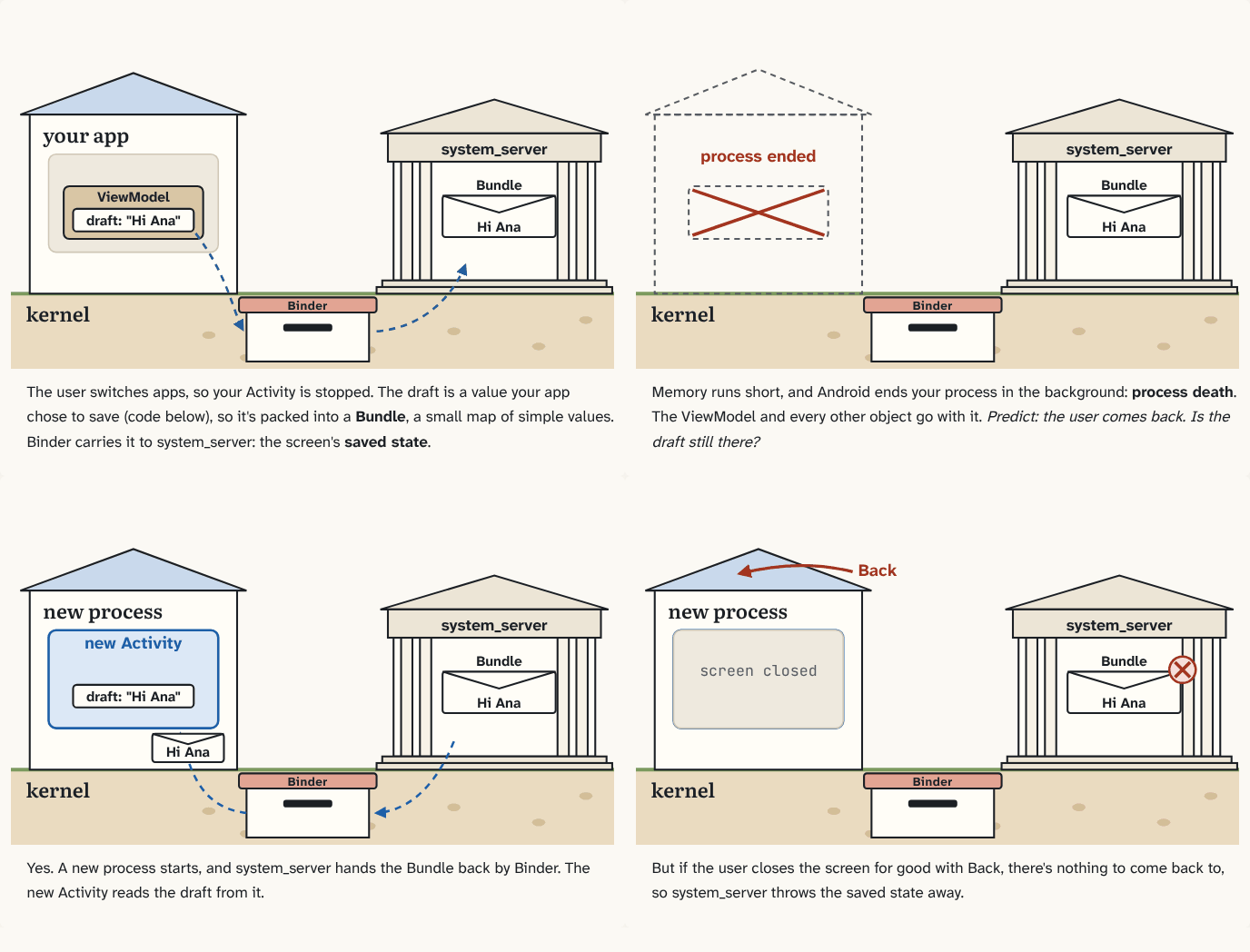
The user switches apps, so your Activity is stopped. The draft is a value your app chose to save (code below), so it's packed into a Bundle, a small map of simple values. Binder carries it to system_server: the screen's saved state.
Step 1 of 4Memory runs short, and Android ends your process in the background: process death. The ViewModel and every other object go with it. Predict: the user comes back. Is the draft still there?
Step 2 of 4Yes. A new process starts, and system_server hands the Bundle back by Binder. The new Activity reads the draft from it.
Step 3 of 4But if the user closes the screen for good with Back, there's nothing to come back to, so system_server throws the saved state away.
Step 4 of 4
The building block
When Android ends your process in the background to free memory, that's process death. Nothing inside the process survives it.
So, before it can happen, your app sends a little of its state somewhere that outlives the process: system_server. Each time your Activity is stopped (the user left it), your app packs what it chose to save into a Bundle, a small map of simple values like text and numbers, and Binder carries it to system_server. That copy is the screen's saved state. When the user comes back to a process that's gone, a new process starts (a cold start, puzzle 12), and system_server hands the Bundle back to the new Activity.
Saved state crosses Binder twice, through the receiver's buffer of about 1 MB (puzzle 16), and it's kept in system_server's memory. So keep it small: what the user typed, an ID, a scroll position. Big data, like the downloaded list, goes in a file on the phone and is read again by its ID.
An Activity fills its Bundle itself, in onSaveInstanceState(). A ViewModel can use saved state too, through a SavedStateHandle: a map that's kept in the saved state. viewModels() hands one to the ViewModel when it creates it.
class DraftViewModel(private val saved: SavedStateHandle) : ViewModel() {
    var draft: String
        get() = saved["draft"] ?: ""
        set(value) { saved["draft"] = value }
}
Saved state survives turning the phone too: the old Activity is stopped before it's destroyed, so its Bundle is saved and handed to the new Activity.
Saved state is for coming back. If the user closes the screen for good with Back, there's nothing to come back to, so system_server throws it away.
| Kept in | Survives turning the phone | Survives process death | Survives Back |
|---|---|---|---|
| a field of the Activity | no | no | no |
| a ViewModel | yes | no | no |
| saved state | yes | yes | no |
| a file on the phone | yes | yes | yes |
The analogy
Before the house can be torn down, the clerk mails the town hall a postcard with the few things that matter. If the house is rebuilt, the town hall mails the postcard to the new clerk. If the owner moves out for good, the town hall bins it.
Check yourself
Sources
- Android Developers: Save UI states (the table: saved state survives "system-initiated process death", not "user complete screen dismissal/finish()"; "only for primitive types and simple, small objects")
- AOSP: PendingTransactionActions.java (when the Activity stops:
ActivityClient.getInstance().activityStopped(mActivity.token, mState, …), with aTransactionTooLargeExceptioncheck right after) - Android reference: SavedStateHandle
What you now know
Before your Activity is stopped, your app sends a small Bundle, its saved state, to system_server by Binder. If the process is ended in the background, a new process gets it back. Back throws it away. Keep it small: it crosses the ~1 MB Binder buffer.
Answer every question above correctly to unlock the next puzzle.
That's everything published so far
You've reached the last puzzle of Android from the foundation. Next: Module 4, continued, about context and why it leaks, tasks and the back stack.
New puzzles are announced on LinkedIn and in the learning log feed.
Something wrong or unclear on this page? Tell me: a puzzle that didn't click is a bug in the puzzle.