Android from the foundation · Puzzle 14 of 16
The main thread's queue
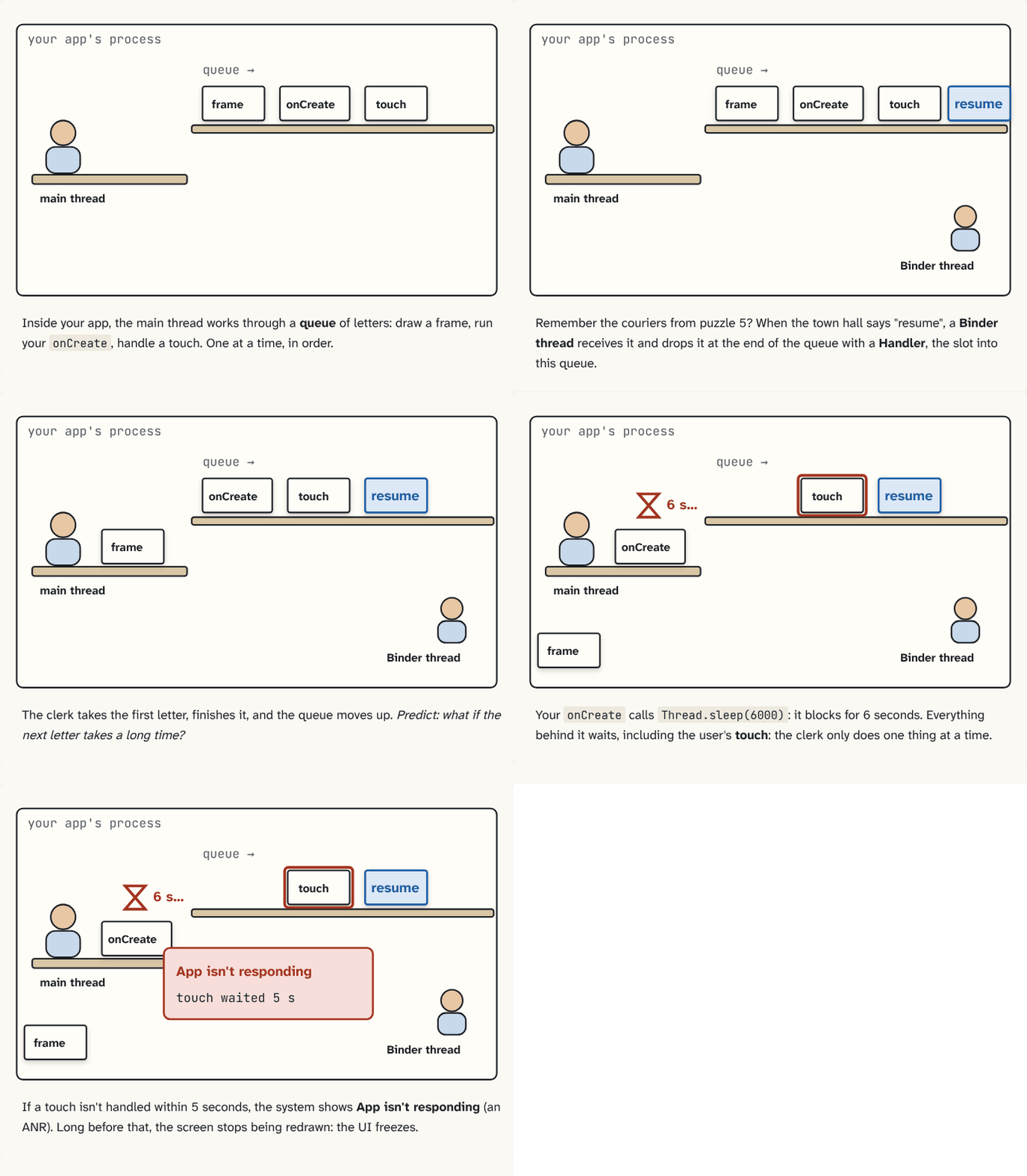
Messages arrive on Binder threads, but screen code must run on the main thread. So everything for the screen waits in one line, and the main thread takes it one by one.
The problem
In puzzle 13, a Binder thread picked up the town hall's message. But in puzzle 2, only the main thread could touch the screen. Why only one thread? Because Android's screen code isn't thread-safe: if two threads changed the same button or text at the same moment, it could end up broken. So how does the message get from the Binder thread to the main thread?
See it
The main thread works from an in-tray: its message queue. Draw the screen, run
onCreate, handle a touch (a tap): each is a message, waiting its turn.Step 1 of 3A Binder thread receives "resume" from the town hall. It doesn't touch the screen: it drops the message at the end of the queue with a
Handler: an object tied to the main thread's queue that drops messages into it. Predict: when will it run?Step 2 of 3When its turn comes. The main thread takes the first message, runs it to the end, and the line moves up: one at a time, in order. This endless take, run, repeat is the Looper.
Step 3 of 3
The building block
The main thread has an in-tray: its message queue. Every piece of screen work waits there as a message: draw the screen, handle a touch, run a lifecycle callback. Touches arrive like lifecycle messages: system_server sends them to your app, and they're posted into the queue.
The Looper is the main thread's endless loop from step 3: take the next message, run it to the end, repeat. A Handler is an object tied to one thread's queue that drops messages into it. The ones on this page are tied to the main thread's queue: the Binder thread uses one, then goes back to waiting (it doesn't wait for the main thread), and handler.post { … }post() wraps your code in a Message and puts it in this Handler's queue. 438 public final boolean post(@NonNull Runnable r) {
439 return sendMessageDelayed(getPostMessage(r), 0);
440 }
…
782 private boolean enqueueMessage(@NonNull MessageQueue queue, @NonNull Message msg,
783 long uptimeMillis) {
784 msg.target = this;
…
789 }Handler.java, line 438 · AOSP frameworks/base ↗ is how you drop your own code in. Every app process starts in ActivityThread.main()The real entry point of every app process: it prepares the main Looper, says hello to system_server, then loops forever. 8907 public static void main(String[] args) {
…
8927 Looper.prepareMainLooper();
…
8943 thread.attach(false, startSeq);
…
8956 Looper.loop();ActivityThread.java, line 8907 · AOSP frameworks/base ↗, Android's code that sets up your app's main thread, which sets up this loop for the main thread and runs Looper.loop()The main thread's endless loop: take one message, run it, repeat. 304 public static void loop() {
…
327 for (;;) {
328 if (!loopOnce(me, ident, thresholdOverride)) {
329 return;
330 }
331 }Looper.java, line 304 · AOSP frameworks/base ↗ forever.
The analogy
The clerk at the front desk has an in-tray. Couriers drop letters in through the slot; the clerk takes one at a time and finishes it before the next.
Check yourself
Sources
What you now know
Binder thread → Handler → the main thread's message queue → the Looper runs it. One message at a time, in order, so buttons and text never need locks.
Answer every question above correctly to unlock the next puzzle.