Performance, under the hood · Puzzle 5 · 6 of 10
Who puts pixels on screen
Your app never touches the display. It fills a block of memory with pixels and hands it to someone else, who combines it with every other window on screen. Here's that hand-off, the path every frame takes.
The problem
On your screen right now are the status bar, your app, maybe a keyboard, and the navigation bar. Each comes from a different process. Yet the display shows one picture, 60 or 120 times a second, without tearing. Who puts it together, and what exactly does your app hand over?
See it
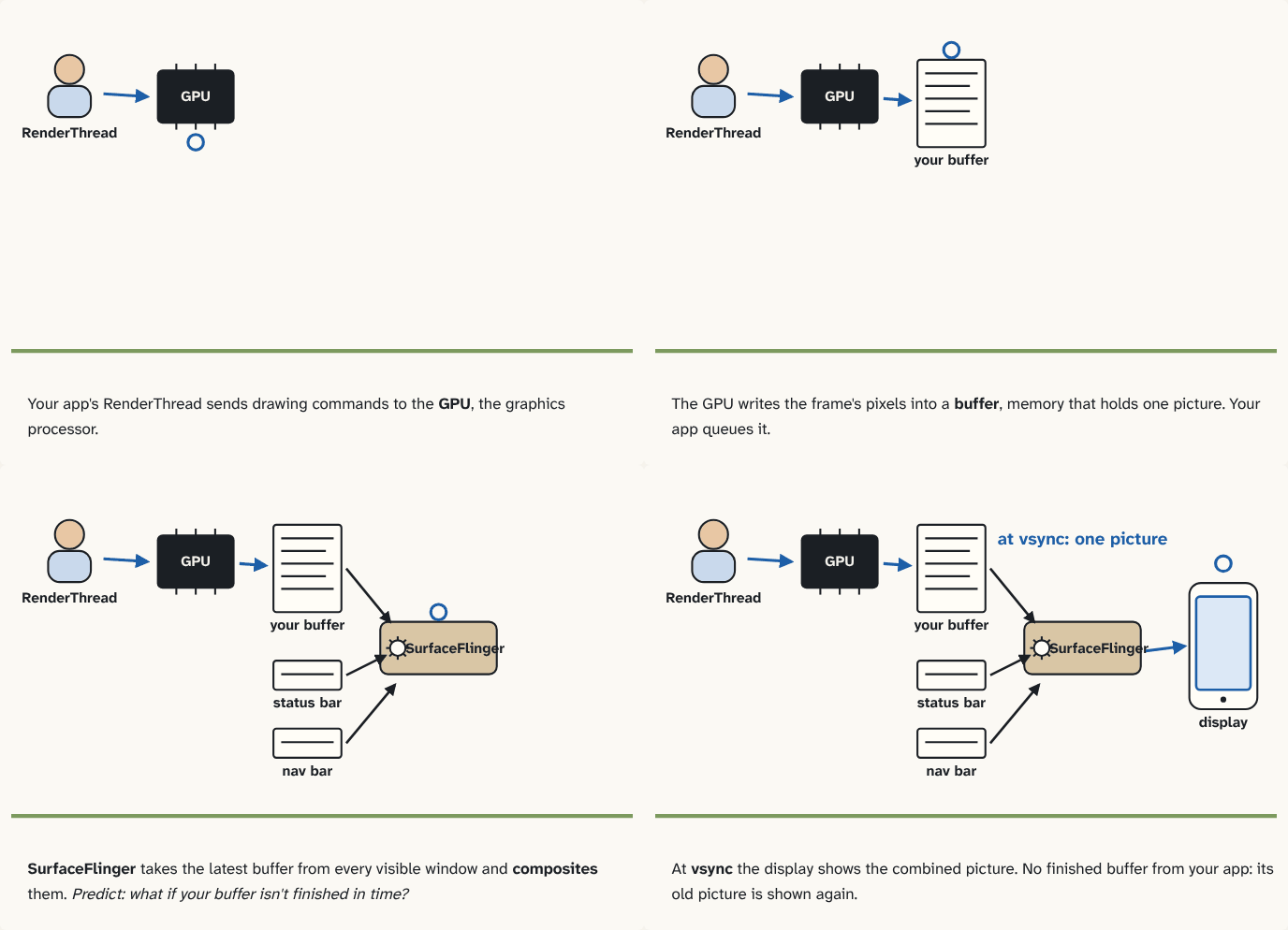
Your app's RenderThread sends drawing commands to the GPU, the graphics processor.
Step 1 of 4The GPU writes the frame's pixels into a buffer, memory that holds one picture. Your app queues it.
Step 2 of 4SurfaceFlinger takes the latest buffer from every visible window and composites them. Predict: what if your buffer isn't finished in time?
Step 3 of 4At vsync the display shows the combined picture. No finished buffer from your app: its old picture is shown again.
Step 4 of 4
The building block
The display redraws its picture at a fixed rate, 60 or 120 times a second. Just before each refresh it sends vsync, a signal that says "a new picture is about to be shown". Everything below happens in rhythm with it.
In the Android course you saw a frame's work: the main thread measures, lays out and records what to draw, and the RenderThread takes it from there. The RenderThread sends those drawing commands to the GPU, the graphics processor: a separate part of the chip built to fill millions of pixels at once. Android's docs put it plainly: drawing on a view's canvas uses the GPU.
The GPU writes the pixels into a buffer, a block of memory that holds one picture. Your app doesn't own the display, so it queues the finished buffer and moves on to the next frame with a fresh one.
On the other side of that queue is SurfaceFlinger, a system service. Between display refreshes, it takes the latest buffer from every visible window (your app, the status bar, the keyboard) and composites them: combines them into the one picture the display shows. It only accepts buffers between refreshes, so the screen never changes halfway through drawing.
So a frame is on time when its buffer, pixels finished by the GPU, is queued before the refresh it's meant for. Late in any step, main thread, RenderThread or GPU, and the display shows the old picture again. That's the jank the next puzzle measures.
The analogy
A newspaper's layout desk. Each reporter (an app) types their article onto their own page (a buffer), with a fast typesetter (the GPU). Before the press runs (vsync), the editor (SurfaceFlinger) takes the latest page from every reporter and pastes them into one front page. An article not ready in time? Yesterday's version runs again.
Check yourself
Sources
- Android Developers: Hardware acceleration ("all drawing operations that are performed on a View's canvas use the GPU")
- Android Open Source Project: Graphics ("A surface represents a block of memory that gets composited to the screen."; "All of the visible surfaces rendered are composited onto the display by SurfaceFlinger.")
- Android Open Source Project: BufferQueue and Gralloc ("The BufferQueue class connects components that generate buffers of graphical data (producers) to components that accept the data for display or further processing (consumers).")
- Android Open Source Project: SurfaceFlinger and WindowManager ("Though apps can submit buffers at any time, SurfaceFlinger only wakes up to accept buffers between display refreshes"; "This minimizes memory usage and avoids visible tearing on the screen, which can occur when updating the display mid-refresh.")
What you now know
The display redraws at a fixed rate and sends vsync before each refresh. Your app's RenderThread gives drawing commands to the GPU, which fills a buffer with the frame's pixels. The finished buffer is queued for SurfaceFlinger, which composites the latest buffer of every visible window into what the display shows. A frame counts only once its buffer is ready when SurfaceFlinger needs it.
Answer every question above correctly to unlock the next puzzle.
Something wrong or unclear on this page? Tell me: a puzzle that didn't click is a bug in the puzzle.