Kotlin Multiplatform, from the compiler up · Puzzle 10 · 11 of 16
The main thread on iOS
On Android you know the main thread: a Looper takes messages from a queue, one at a time, and only that thread may touch the UI. iOS has the same shape under other names. Here they are, before your coroutines run on it.
The problem
Your shared code updates data that the iOS screen shows. On Android you'd make sure that happens on the main thread, which you know as a Looper with a MessageQueue. What does iOS have instead, and does the same "UI only on the main thread" rule apply?
See it
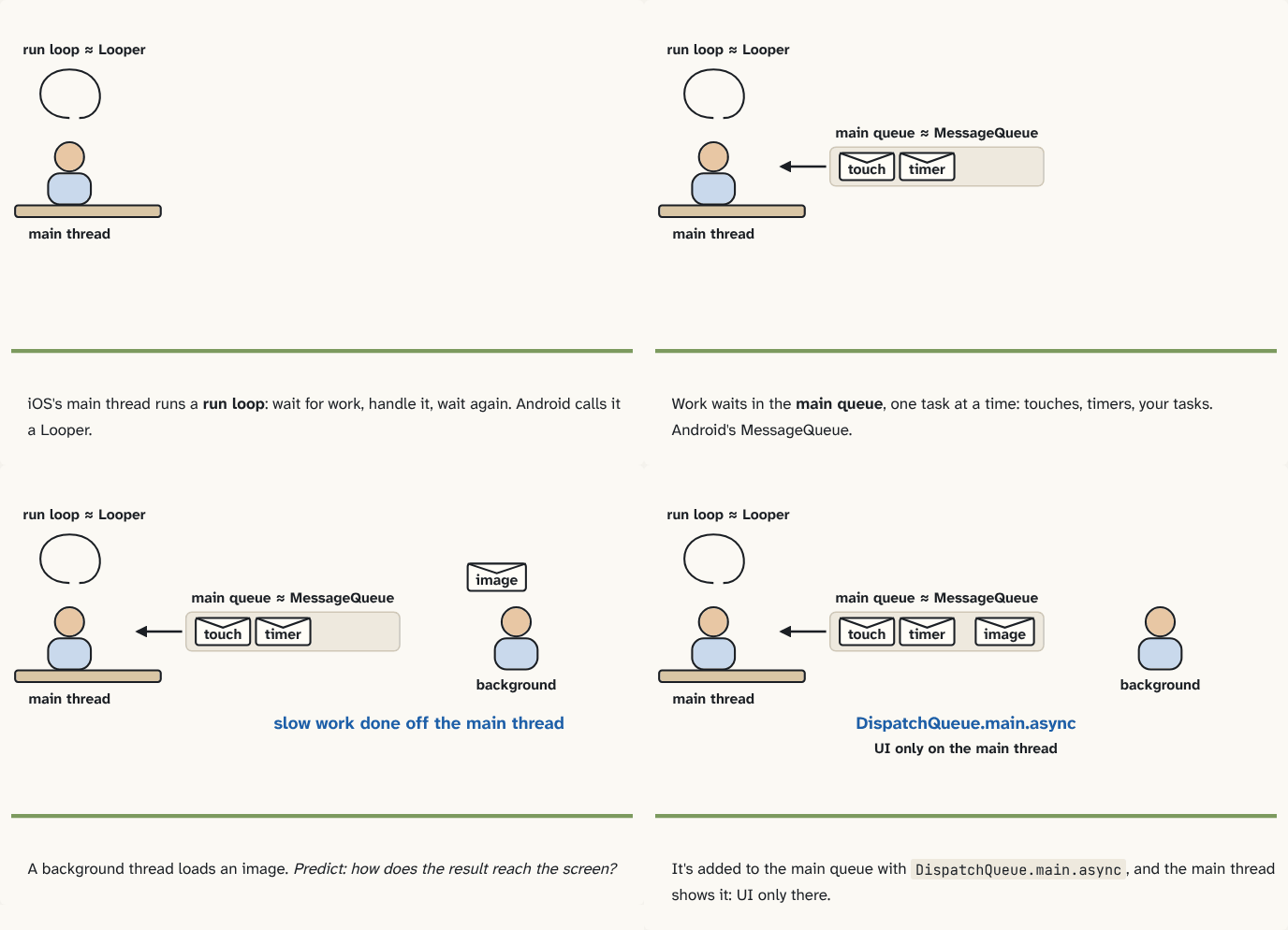
iOS's main thread runs a run loop: wait for work, handle it, wait again. Android calls it a Looper.
Step 1 of 4Work waits in the main queue, one task at a time: touches, timers, your tasks. Android's MessageQueue.
Step 2 of 4A background thread loads an image. Predict: how does the result reach the screen?
Step 3 of 4It's added to the main queue with
DispatchQueue.main.async, and the main thread shows it: UI only there.Step 4 of 4
The building block
Same shape, different names:
| Android | iOS | Its job |
|---|---|---|
| Looper | run loop | keeps the main thread alive: wait for work, handle it, wait again |
| MessageQueue | main queue | the line of tasks waiting for the main thread |
handler.post { } | DispatchQueue.main.async { } | add a task to that line |
The main thread's run loop handles touches, timers and the tasks in the main queue, one at a time. Apple describes it as an event-processing loop that keeps the thread busy when there's work and lets it sleep when there isn't.
The rule you know holds: UIKit, like Android's UI toolkit, may be touched only from the main thread. And the same consequence follows: a slow task on the main thread holds up every touch and frame behind it.
DispatchQueue.global().async {        // slow work off the main thread
    let image = loadImage()
    DispatchQueue.main.async {        // back to the main queue
        imageView.image = image       // UI: main thread only
    }
}
The analogy
The same shop under a new owner: the counter clerk (the main thread) still serves one customer at a time from one line (the main queue), and only the clerk may touch the shop window (the UI). Only the signs changed.
Check yourself
Sources
- Apple: Threading Programming Guide, Run Loops ("A run loop is an event processing loop that you use to schedule work and coordinate the receipt of incoming events. The purpose of a run loop is to keep your thread busy when there is work to do and put your thread to sleep when there is none.")
- Apple: DispatchQueue ("An object that manages the execution of tasks serially or concurrently on your app's main thread or on a background thread")
What you now know
iOS's main thread runs a run loop, the role of Android's Looper: it waits for work, handles it, and waits again. Work for it waits in the main queue, the role of the MessageQueue, and DispatchQueue.main.async plays handler.post. As on Android, UIKit may be touched only from the main thread, and slow work there freezes the screen.
Answer every question above correctly to unlock the next puzzle.
Something wrong or unclear on this page? Tell me: a puzzle that didn't click is a bug in the puzzle.