Kotlin Multiplatform, from the compiler up · Puzzle 2 · 3 of 16
How Kotlin calls Apple
In iosMain, your Kotlin can call Apple's own code, like the class that knows the device's name. But Apple's code isn't Kotlin. Here's how Kotlin/Native makes it callable.
The problem
Puzzle 1 said iosMain can use what only iOS has. On iOS, the device's name and system version come from an Apple class called UIDevice. Apple wrote it for its own languages, not for Kotlin. So how can a Kotlin file in iosMain call it?
See it
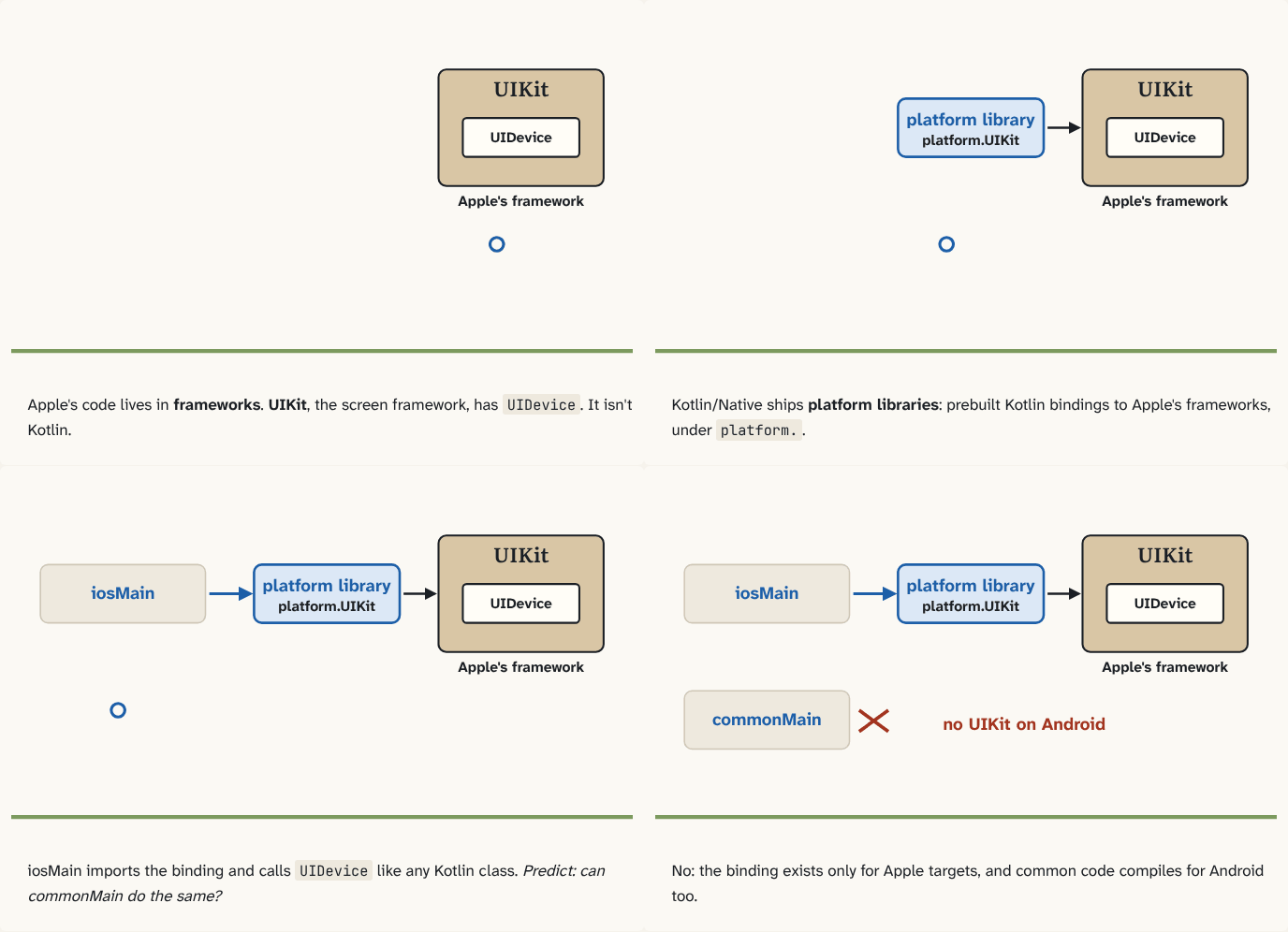
Apple's code lives in frameworks. UIKit, the screen framework, has
UIDevice. It isn't Kotlin.Step 1 of 4Kotlin/Native ships platform libraries: prebuilt Kotlin bindings to Apple's frameworks, under
platform..Step 2 of 4iosMain imports the binding and calls
UIDevicelike any Kotlin class. Predict: can commonMain do the same?Step 3 of 4No: the binding exists only for Apple targets, and common code compiles for Android too.
Step 4 of 4
The building block
Apple's code is grouped into frameworks: bundles of ready-made code for one area. Foundation has basics like dates, text and unique IDs; UIKit has everything about screens, including UIDevice.
Kotlin can't read those frameworks directly. So Kotlin/Native ships platform libraries: prebuilt Kotlin descriptions, called bindings, of each target's native libraries. For Apple targets they cover Apple's frameworks. The packages are there by default, under platform.:
// iosMain
import platform.UIKit.UIDevice

fun systemName(): String = UIDevice.currentDevice.systemName
When you compile, Kotlin/Native sees which ones you used and links Apple's real code in.
Two consequences:
- These bindings exist only for Apple targets. That's why
import platform.UIKitworks in iosMain and fails in commonMain (puzzle 1's rule: common code may use only what every target has). - The names and shapes are Apple's, not Kotlin's:
UIDevice.currentDevicereads a little foreign. That's normal.
The analogy
A phrasebook for a country whose language you don't speak. You don't learn the language; you look up the phrase and say it, and you're understood. Each target comes with its own phrasebook, and the Apple one only works in Apple's countries.
Check yourself
Sources
- Kotlin docs: Platform libraries ("To provide access to native services of operating systems, the Kotlin/Native distribution includes a set of prebuilt libraries specific to each target. These are called platform libraries. The packages from platform libraries are available by default"; "The Kotlin/Native compiler automatically detects which platform libraries are accessed and links the necessary ones")
- Kotlin docs: The basics of a Multiplatform project (an Apple source set using
import platform.Foundation.NSUUID)
What you now know
Kotlin/Native ships platform libraries: prebuilt Kotlin bindings for each target's native libraries. On Apple targets they cover Apple's frameworks, such as Foundation and UIKit, so code in iosMain can import platform.UIKit.UIDevice and call it like Kotlin. They exist only on Apple targets, which is why such calls live in iosMain, never in commonMain.
Answer every question above correctly to unlock the next puzzle.
Something wrong or unclear on this page? Tell me: a puzzle that didn't click is a bug in the puzzle.