Kotlin Multiplatform, from the compiler up · Puzzle 15 · 16 of 16
One canvas on iOS
On iOS, your Compose screen doesn't become UIKit buttons and labels. It's drawn. Here's what UIKit sees, and why VoiceOver and native controls need a bridge.
The problem
Puzzle 14 said the platform layer is rewritten per target. On iOS, does your Column with a Button turn into a UIStackView with a UIButton? If it doesn't, how does VoiceOver know there's a button to read out?
See it
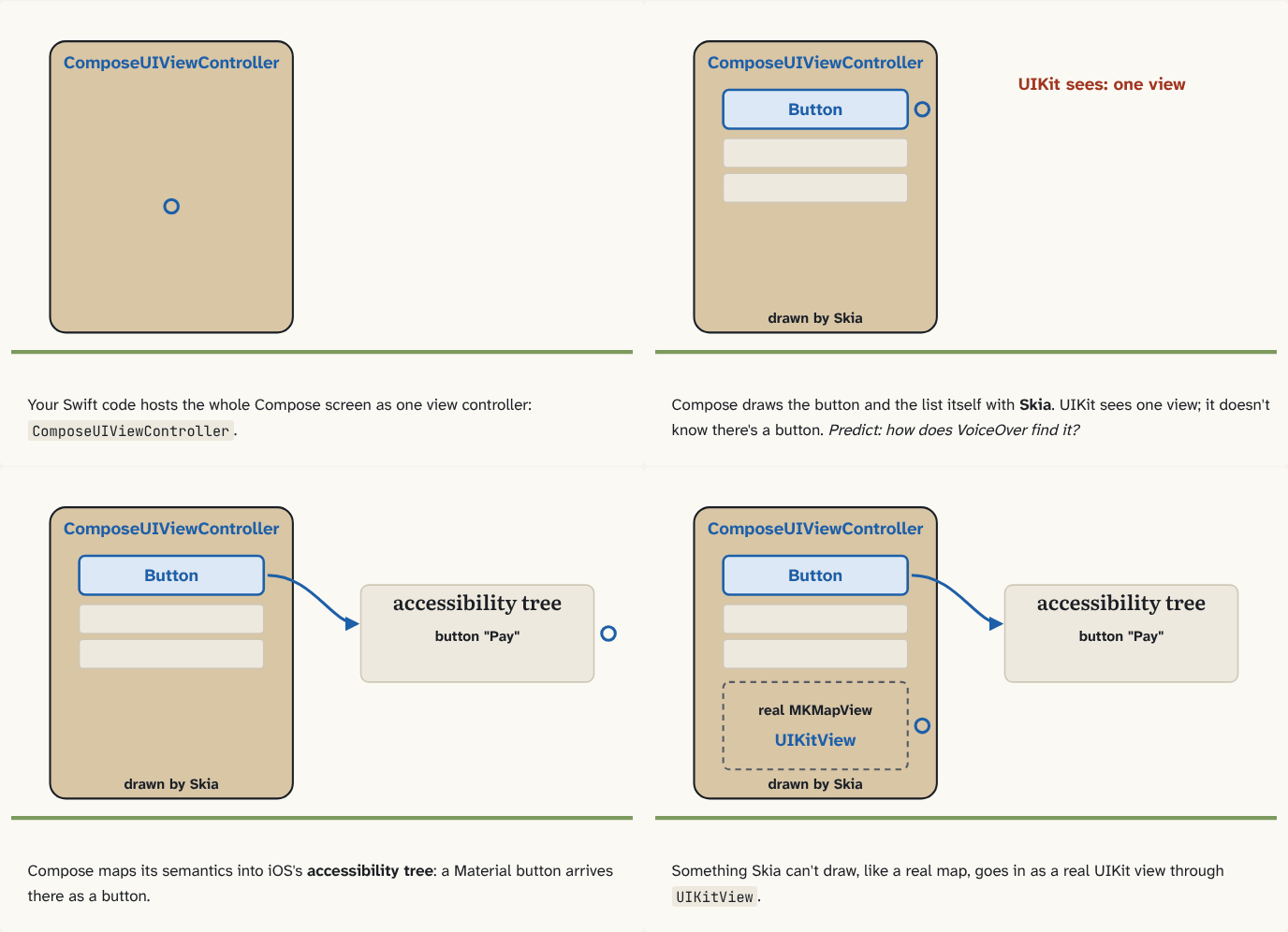
Your Swift code hosts the whole Compose screen as one view controller:
ComposeUIViewController.Step 1 of 4Compose draws the button and the list itself with Skia. UIKit sees one view; it doesn't know there's a button. Predict: how does VoiceOver find it?
Step 2 of 4Compose maps its semantics, what each element is and says, into iOS's accessibility tree: a Material button arrives there as a button.
Step 3 of 4Something Skia can't draw, like a real map, goes in as a real UIKit view through
UIKitView.Step 4 of 4
The building block
It doesn't turn into UIKit buttons and labels. Your Swift code hosts the whole Compose screen as one view controller, returned by ComposeUIViewController { App() }. Inside it, Compose draws every pixel itself with Skia, a graphics library for shapes and text, which Kotlin reaches through Skiko ("Skia for Kotlin").
So UIKit sees one view. It doesn't know there's a button at the top or a list below. That has two consequences.
First, accessibility. VoiceOver reads iOS's accessibility tree: the list of on-screen elements with their labels and roles. Compose already knows what each element is, from the semantics that Material components attach, so Compose Multiplatform maps that data into native accessibility objects. A Material Button arrives in the tree as a button. A shape you drew yourself, with no semantics, is invisible to VoiceOver, unless you give it some, for example with Modifier.semantics { contentDescription = "Pay" }, or make it clickable.
Second, native controls. A map, a web view or a video player is a UIKit view that Skia can't draw. UIKitView puts a real one into your Compose layout, and Compose sizes and positions it like any other composable.
And Compose doesn't have to own the whole app: a UIKit or SwiftUI app can show Compose for just one screen, one view controller among its own.
The analogy
A painted mural instead of a shop window full of real objects. Passers-by see the same scene, but a blind visitor needs a guide who knows what each painted thing is (the accessibility tree), and anything that must really open, like a door, is a real door set into the wall (UIKitView).
Check yourself
Sources
- Skiko README ("Skiko (short for Skia for Kotlin) is the graphical library exposing significant part of Skia library APIs to Kotlin, along with the gluing code for rendering context"; supported platforms include "Kotlin/Native on iOS")
- Kotlin docs: Support for iOS accessibility features ("semantics data produced by Compose APIs is now mapped to native objects and properties that are consumed by iOS Accessibility Services. For most interfaces built with Material widgets, this should happen automatically.")
- Kotlin docs: Integration with the UIKit framework ("To use UIKit elements inside Compose Multiplatform, add the UIKit elements that you want to use to a UIKitView")
What you now know
On iOS, Compose Multiplatform draws your whole UI itself with Skia, through Skiko, inside one hosted view: ComposeUIViewController. UIKit sees one view, not your buttons. So Compose maps its own semantics into iOS's accessibility tree for VoiceOver, and a native control such as a map goes in through UIKitView.
Answer every question above correctly to unlock the next puzzle.
That's everything published so far
You've reached the last puzzle of Kotlin Multiplatform, from the compiler up. Next: Module 4: Compose Multiplatform in practice, about touch, scrolling and text input on iOS; accessibility through VoiceOver; interop with SwiftUI and UIKit in both directions; resources and navigation.
New puzzles are announced on LinkedIn and in the learning log feed.
Something wrong or unclear on this page? Tell me: a puzzle that didn't click is a bug in the puzzle.