Kotlin Multiplatform, from the compiler up · Puzzle 12 · 13 of 16
One framework, not two
In puzzle 5, Kotlin/Native packed your shared code into a framework. Your project has several shared modules. Here's why they should reach Swift as one framework, and what each exported line costs.
The problem
In puzzle 5, your shared code became a framework that Swift imports. Your project has grown: a network module, a database module, a features module. The obvious move is one framework per module, so the iOS app imports three. Why does that go wrong?
See it
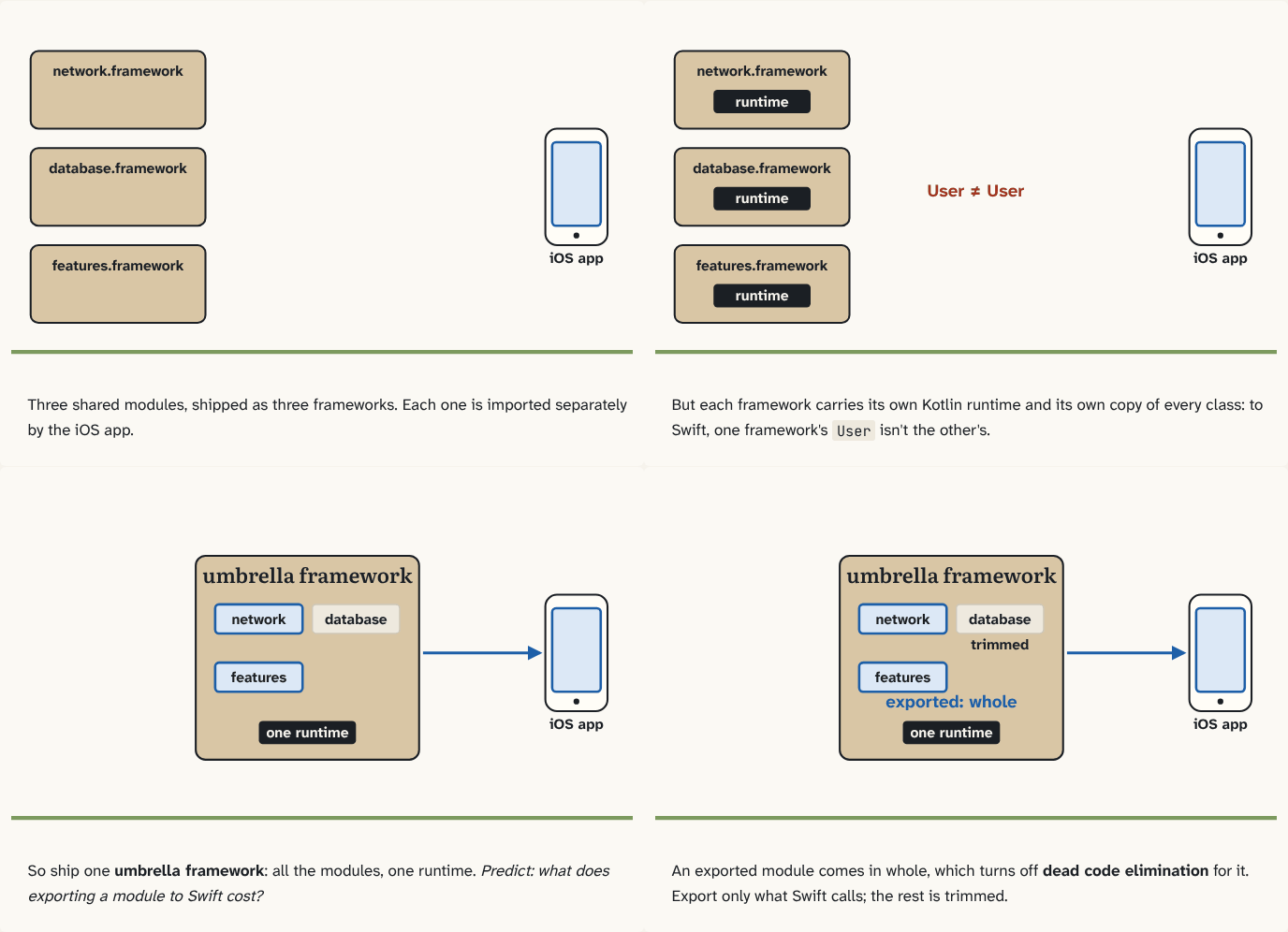
Three shared modules, shipped as three frameworks. Each one is imported separately by the iOS app.
Step 1 of 4But each framework carries its own Kotlin runtime and its own copy of every class: to Swift, one framework's
Userisn't the other's.Step 2 of 4So ship one umbrella framework: all the modules, one runtime. Predict: what does exporting a module to Swift cost?
Step 3 of 4An exported module comes in whole, which turns off dead code elimination for it. Export only what Swift calls; the rest is trimmed.
Step 4 of 4
The building block
A Kotlin framework isn't only your code: it also carries the Kotlin runtime, the standard library and the garbage collector from puzzle 9. Build three frameworks and the app carries three runtimes, each with its own copy of everything, and Kotlin's docs say using several Kotlin frameworks in one Swift app is limited: a Kotlin type from one framework isn't the same type as the same class in another.
So you ship one umbrella framework: a single framework, with one runtime, that brings in every Kotlin module Swift needs. In Gradle you list which modules it exports to Swift:
binaries.framework { export(project(":network")) }Exporting has a cost. An exported module comes in with its whole API, even if Swift uses a tiny part of it, and that turns off dead code elimination for it: the step that leaves out compiled code nothing uses, to keep the app small. So export only the modules Swift actually calls; the others still go into the framework, but trimmed to the code that's used.
For distribution, the umbrella framework is usually built as an XCFramework: one bundle holding the builds for every Apple device and simulator, which the iOS project adds like any other library.
The analogy
One shipping container instead of three: each container comes with its own crane (the runtime), and goods from one container can't be swapped for the same goods from another. And whatever you put on the manifest (the export list) is shipped whole, even the parts nobody ordered.
Check yourself
Sources
- Kotlin docs: Build final native binaries ("Usage of several Kotlin/Native frameworks in a Swift application is limited, but you can create an umbrella framework and export all these modules to it"; "When you export a dependency, it includes all of its API to the framework API. The compiler adds the code from this dependency to the framework, even if you use a small fraction of it. This disables dead code elimination"; "XCFrameworks… gather logic for all the target platforms and architectures in a single bundle")
What you now know
Each Kotlin framework carries its own copy of the Kotlin runtime, and using several in one Swift app is limited. So ship one umbrella framework that exports the modules Swift needs. Every exported module comes in whole, which turns off dead code elimination for it: export only what Swift calls.
Answer every question above correctly to unlock the next puzzle.
Something wrong or unclear on this page? Tell me: a puzzle that didn't click is a bug in the puzzle.