iOS for Android developers · Puzzle 4 · 5 of 5
Counting, not collecting
On Android, a garbage collector finds objects nothing uses anymore and frees them, cycles included. Swift has no garbage collector. Here's what it does instead, and the leak it can't see.
The problem
On Android, you rarely think about freeing memory: the garbage collector, from time to time, finds every object nothing can reach anymore and frees it, even two objects that point at each other. Swift on iOS has no garbage collector. So who frees your objects, when, and is there anything it misses?
See it
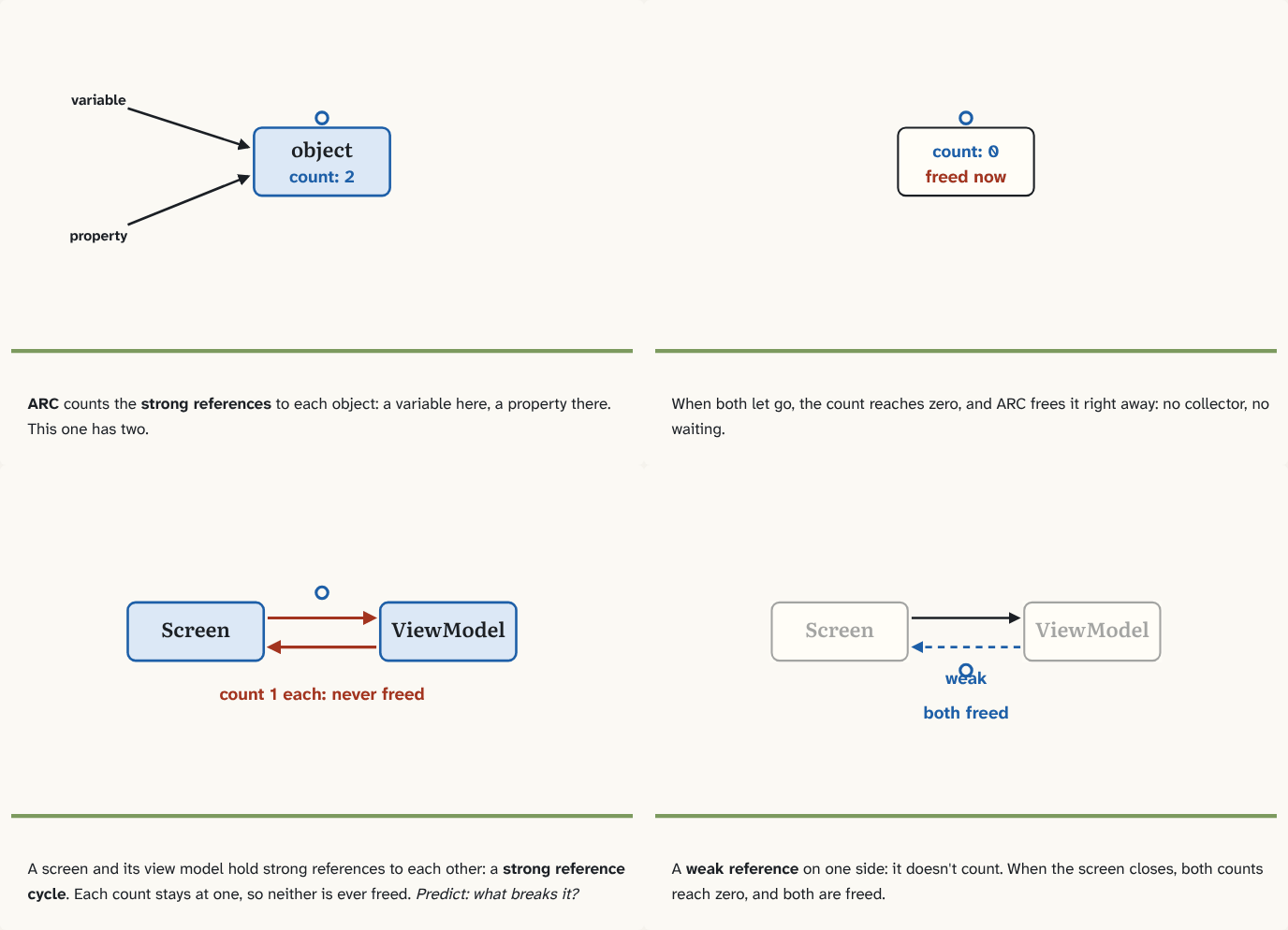
ARC counts the strong references to each object: a variable here, a property there. This one has two.
Step 1 of 4When both let go, the count reaches zero, and ARC frees it right away: no collector, no waiting.
Step 2 of 4A screen and its view model hold strong references to each other: a strong reference cycle. Each count stays at one, so neither is ever freed. Predict: what breaks it?
Step 3 of 4A weak reference on one side: it doesn't count. When the screen closes, both counts reach zero, and both are freed.
Step 4 of 4
The building block
Swift uses ARC, Automatic Reference Counting, for class instances (structs and enums are values, copied rather than shared, so they need no counting). Each object keeps a count of the strong references to it: the variables, properties and collections that hold it. Every new one adds one; every one that goes away subtracts one. When the count reaches zero, ARC frees the object right away. No collector running in the background: memory goes back the moment it's no longer used (the counting itself has a small cost on every reference).
That has one blind spot. If two objects hold strong references to each other, say a screen holds its view model and the view model holds the screen back, then even after everything else lets go, each still counts one reference: the other one. Neither count reaches zero, so neither is ever freed. That's a strong reference cycle, and it's a leak. A garbage collector would see that nothing else can reach them; ARC only counts, so it can't.
The fix is to make one side a weak reference: a reference that doesn't add to the count. When the object it points to is freed, a weak reference becomes nil by itself. Usually the "child" points back to its owner weakly:
class ViewModel {
    weak var screen: Screen?   // doesn't keep the screen alive
}
The same trap waits in closures: a closure that captures self strongly holds it, so if self also stores that closure, they form a cycle. That's when iOS code writes [weak self].
The analogy
A library card system: each book counts how many cards are holding it, and goes back on the shelf the moment the count is zero. But two books that each hold the other's card keep each other's count at one: neither ever goes back.
Check yourself
Sources
- The Swift Programming Language: Automatic Reference Counting ("Swift uses Automatic Reference Counting (ARC) to track and manage your app's memory usage… ARC automatically frees up the memory used by class instances when those instances are no longer needed"; "two class instances hold a strong reference to each other, such that each instance keeps the other alive. This is known as a strong reference cycle. You resolve strong reference cycles by defining some of the relationships between classes as weak or unowned references")
What you now know
ARC counts the strong references to each object and frees it the moment the count drops to zero. Two objects holding strong references to each other never reach zero: a strong reference cycle, which leaks. Make one side a weak reference, which doesn't keep the object alive.
Answer every question above correctly to unlock the next puzzle.
That's everything published so far
You've reached the last puzzle of iOS for Android developers. Next: Module 2: Screens and the system, about scenes and windows, SwiftUI's rendering model vs UIKit, background execution and Jetsam, launch time.
New puzzles are announced on LinkedIn and in the learning log feed.
Something wrong or unclear on this page? Tell me: a puzzle that didn't click is a bug in the puzzle.