iOS for Android developers · Puzzle 3 · 4 of 5
The main actor
In puzzle 2, you moved work between queues by hand. Kotlin did the same job with coroutines and dispatchers. Swift has its own version, with one idea Kotlin doesn't have built in.
The problem
In puzzle 2, the image went to a background queue and back to the main queue, by hand, in nested blocks. In Kotlin you'd write it straight down, wrapping the slow part in withContext(Dispatchers.IO), and the coroutine does the hopping. Does Swift have that, and how does it keep screen work on the main thread?
See it
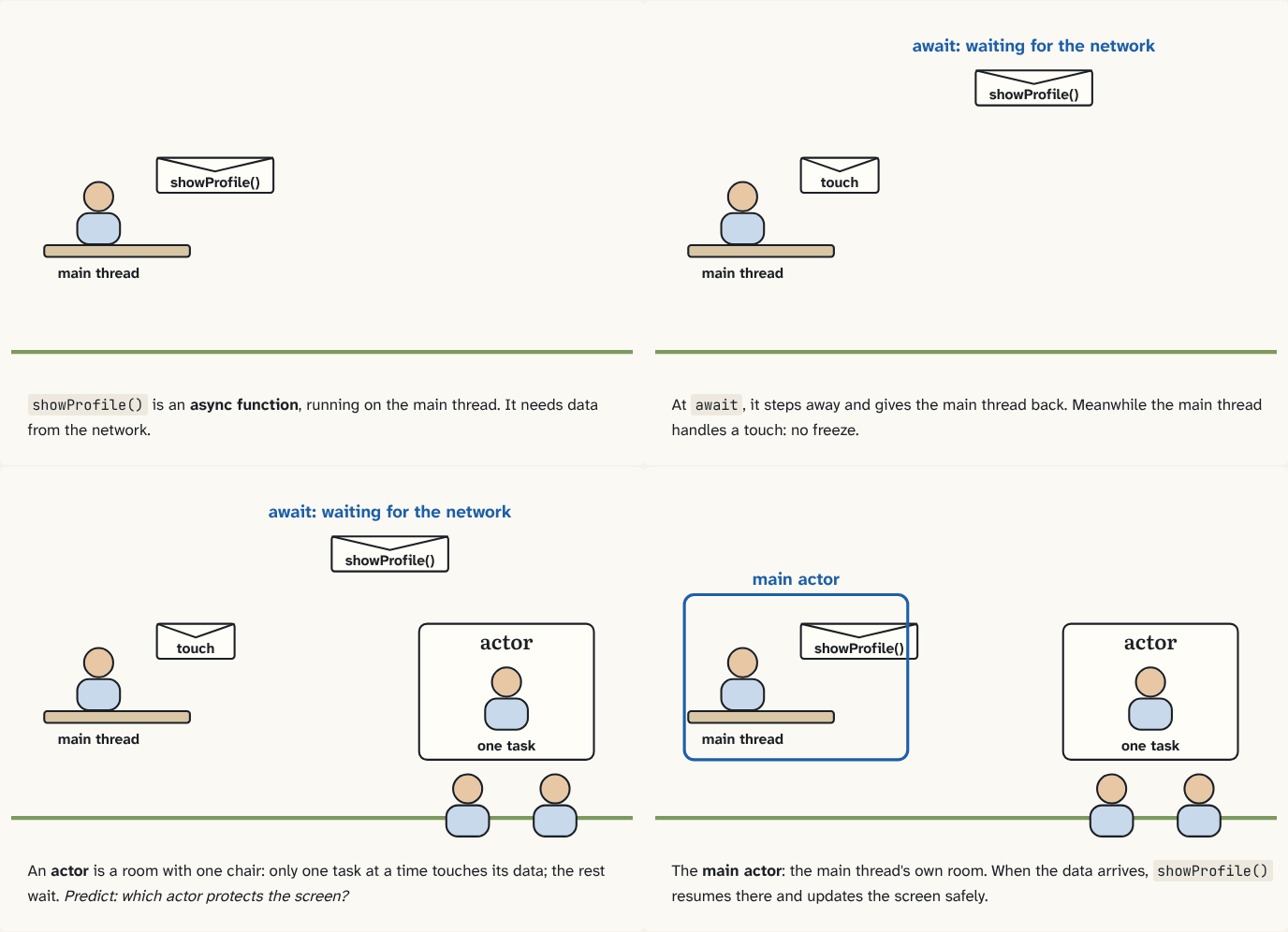
showProfile()is an async function, running on the main thread. It needs data from the network.Step 1 of 4At
await, it steps away and gives the main thread back. Meanwhile the main thread handles a touch: no freeze.Step 2 of 4An actor is a room with one chair: only one task at a time touches its data; the rest wait. Predict: which actor protects the screen?
Step 3 of 4The main actor: the main thread's own room. When the data arrives,
showProfile()resumes there and updates the screen safely.Step 4 of 4
The building block
Swift's version of a suspend function is an async function. Where it waits, you write await: at that point the function may give up its thread so other work can run on it, and later it resumes, possibly on a different thread. Like a coroutine, it reads straight down.
A task is one piece of async work running, like a coroutine. Swift adds one block Kotlin doesn't have built into the language: the actor. An actor is an object that lets only one task at a time touch its data; other code that wants in has to await its turn. That rules out two threads changing the same data at once, by construction rather than by remembering to lock. One catch: "one at a time" holds between awaits. When code on an actor reaches an await, it steps out, another task may come in and change the data, and when the first resumes, things may have moved on. So check your assumptions again after an await.
The most important one is the main actor. It protects all the data used to show the UI: code marked @MainActor always runs on the main thread, taking turns with rendering and touch handling. It's Swift's Dispatchers.Main. Note that await itself moves nothing: it frees the thread while waiting. Where loadUser()'s own work runs depends on which actor it belongs to, so heavy work still needs to be put off the main actor on purpose:
@MainActor
func showProfile() async {
    let user = await api.loadUser()   // the main thread is free while this waits
    nameLabel.text = user.name        // back on the main actor: safe to touch the screen
}
The analogy
The clerk again. An async function steps away from the desk while it waits for a reply, so the clerk can serve others. An actor is a room with one chair: only one task sits in it at a time; the rest wait at the door. Whoever steps out to wait for something gives up the chair, and may find things moved when they come back. The main actor is the clerk's own office, where all screen work happens.
Check yourself
Sources
- The Swift Programming Language: Concurrency ("An asynchronous function in Swift can give up the thread that it's running on, which lets another asynchronous function run on that thread while the first function is blocked"; "actors allow only one task to access their mutable state at a time"; "the main actor protects all of the data that's used to show the UI. The main actor takes turns rendering the UI, handling UI events, and running code that you write that needs to query or update the UI")
What you now know
An async function can give up its thread while it waits, at each await: Swift's suspend. An actor lets only one task at a time touch its data. The main actor protects all UI data, so code marked @MainActor runs on the main thread: Swift's Dispatchers.Main.
Answer every question above correctly to unlock the next puzzle.
Something wrong or unclear on this page? Tell me: a puzzle that didn't click is a bug in the puzzle.