iOS for Android developers · Puzzle 2 · 3 of 5
Queues, not handlers
On Android, you post work to the main thread with a Handler and run slow work on another thread or a coroutine dispatcher. iOS has one system for both. Here it is.
The problem
In puzzle 1, slow work on the main run loop froze the screen. On Android you'd move it to another thread, a coroutine on Dispatchers.IO for example, and then post the result back to the main thread with a Handler. On iOS you don't create those threads yourself either. Where does the slow work go, and how does the result get back?
See it
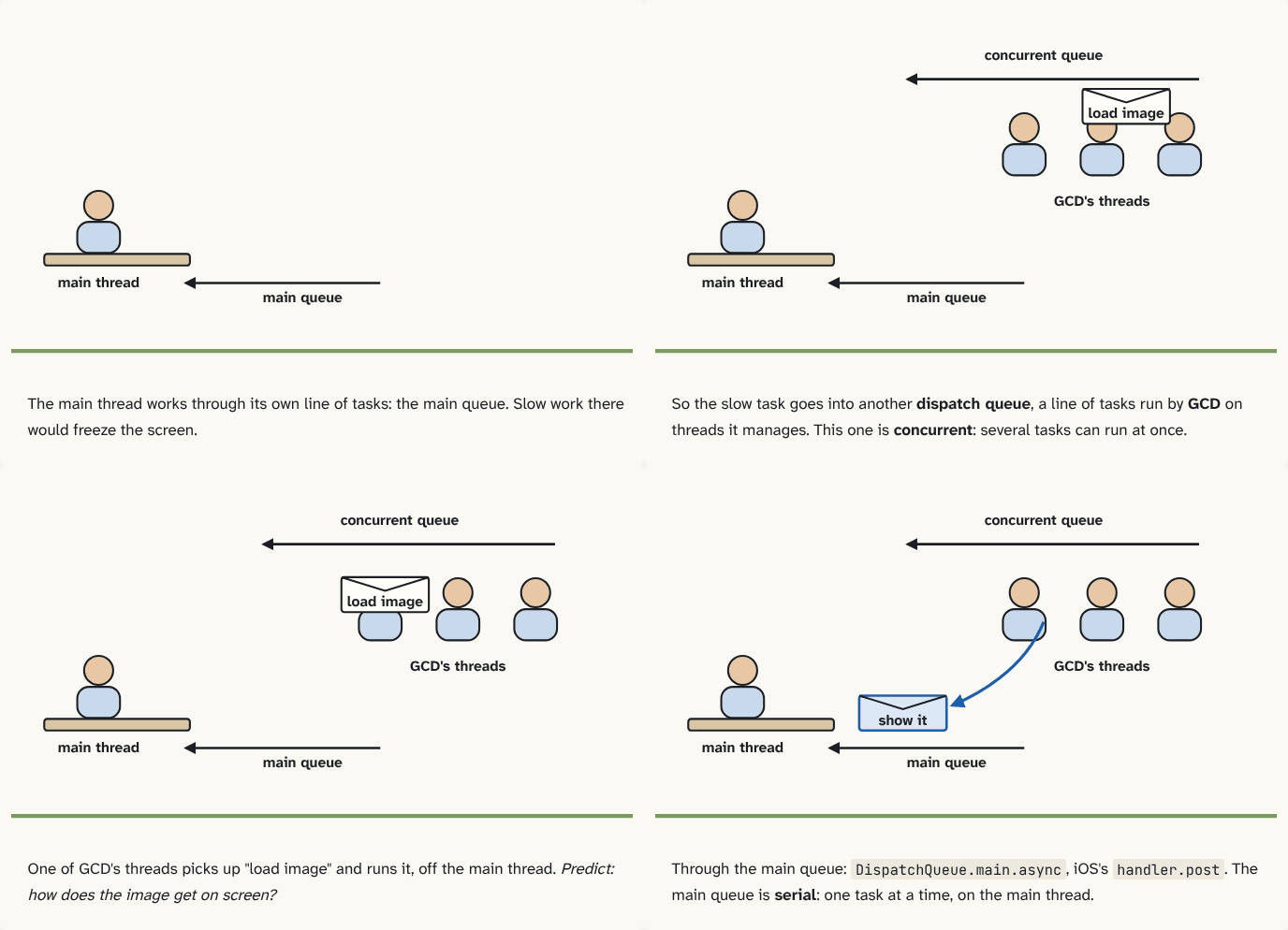
The main thread works through its own line of tasks: the main queue. Slow work there would freeze the screen.
Step 1 of 4So the slow task goes into another dispatch queue, a line of tasks run by GCD on threads it manages. This one is concurrent: several tasks can run at once.
Step 2 of 4One of GCD's threads picks up "load image" and runs it, off the main thread. Predict: how does the image get on screen?
Step 3 of 4Through the main queue:
DispatchQueue.main.async, iOS'shandler.post. The main queue is serial: one task at a time, on the main thread.Step 4 of 4
The building block
iOS's answer is GCD, Grand Central Dispatch. Instead of threads, you think in dispatch queues: first-in, first-out lines of tasks. You add a task, a closure, to a queue; GCD runs it on one of a pool of threads that it creates and manages for you.
A queue is either serial, running one task at a time in order, or concurrent, able to run several of its tasks at the same time on different threads.
One queue is special: the main queue. It's serial, and its tasks run on the main thread: they're one of the kinds of work the main run loop from puzzle 1 picks up, next to touches and timers. The others you'll use most are the global queues: concurrent queues GCD provides, ready to use, for work off the main thread. So the iOS pattern is the Android one, with new names:
DispatchQueue.global().async {          // a concurrent queue: off the main thread
    let image = loadBigImage()          // slow work
    DispatchQueue.main.async {          // back to the main queue
        imageView.image = image         // screen work, on the main thread
    }
}
DispatchQueue.main.async is iOS's handler.post: it adds your task to the main queue, and the main thread runs it when it gets there. The rule is the same as Android's: screen work only on the main queue.
The analogy
The clerk from puzzle 1 still has one in-tray: the main queue. But the back office no longer has named workers: it has more in-trays, and a manager (GCD) who assigns whoever is free to pick up the next task.
Check yourself
Sources
- Apple: DispatchQueue ("An object that manages the execution of tasks serially or concurrently on your app's main thread or on a background thread. Dispatch queues are FIFO queues to which your application can submit tasks in the form of block objects. Dispatch queues execute tasks either serially or concurrently. Work submitted to dispatch queues executes on a pool of threads managed by the system.")
What you now know
Grand Central Dispatch runs tasks from dispatch queues on a pool of threads it manages. A serial queue runs one task at a time, in order; a concurrent queue can run several at once. The main queue runs on the main thread, so DispatchQueue.main.async is iOS's handler.post.
Answer every question above correctly to unlock the next puzzle.
Something wrong or unclear on this page? Tell me: a puzzle that didn't click is a bug in the puzzle.