iOS for Android developers · Start here · 1 of 5
Frozen, not stopped
On Android, an app in the background keeps its process, and its threads can keep running. On iOS, a few seconds after the user leaves, your app stops running any code at all. Here's what that means for your work.
The problem
On Android, when the user switches away, your Activity is stopped, but your process lives on: a coroutine can finish its upload, a thread can keep writing to the database. You save state in onStop and the process might still run for a long time. Write the same app for iOS, and the upload dies a few seconds after the user leaves. What happens to an iOS app in the background?
See it
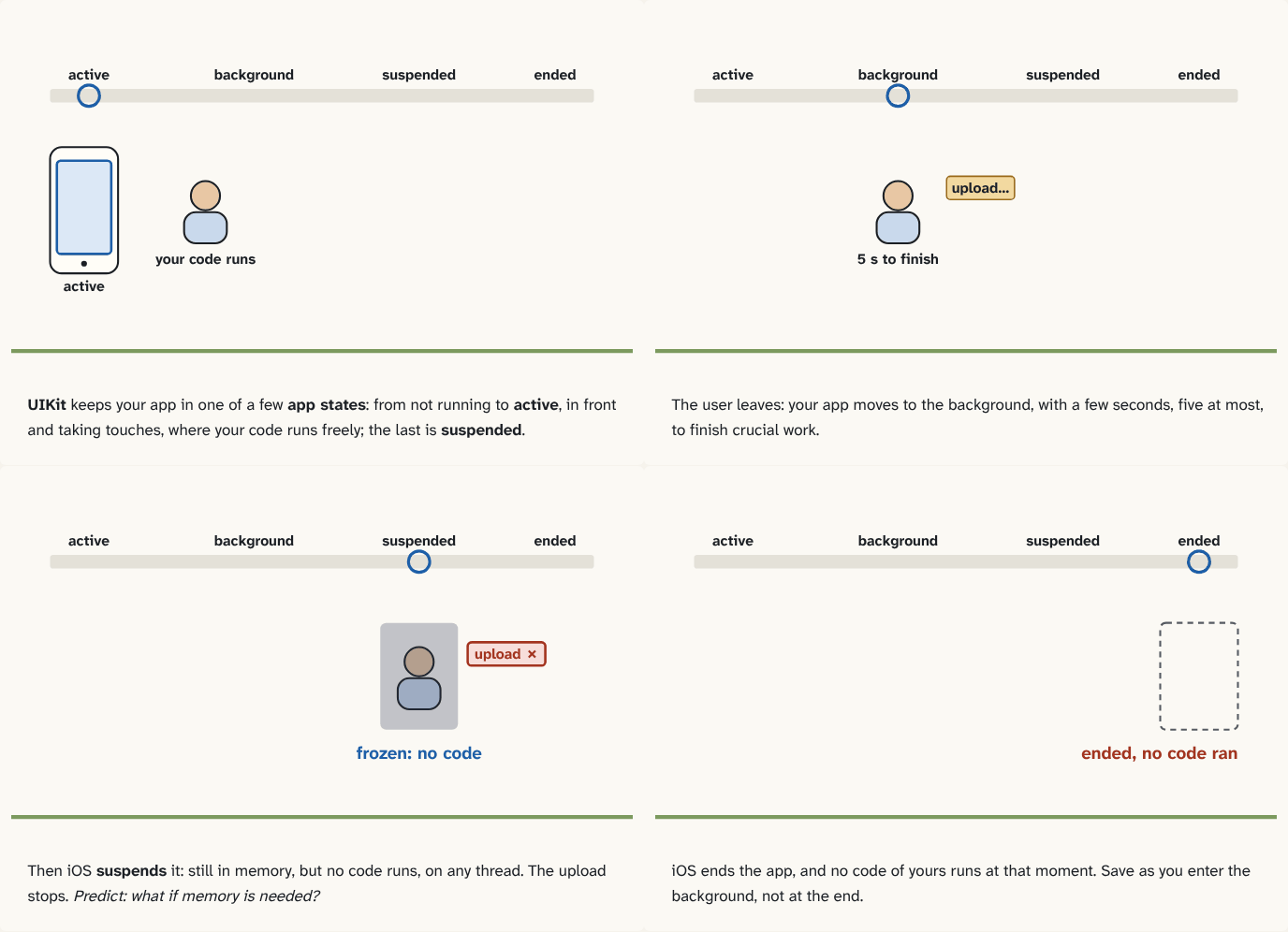
UIKit keeps your app in one of a few app states: from not running to active, in front and taking touches, where your code runs freely; the last is suspended.
Step 1 of 4The user leaves: your app moves to the background, with a few seconds, five at most, to finish crucial work.
Step 2 of 4Then iOS suspends it: still in memory, but no code runs, on any thread. The upload stops. Predict: what if memory is needed?
Step 3 of 4iOS ends the app, and no code of yours runs at that moment. Save as you enter the background, not at the end.
Step 4 of 4
The building block
UIKit, Apple's framework that runs an iOS app's screens, keeps every app in one of a few app states: not running, inactive (in front but not taking touches, like during a phone call banner), active (in front, taking touches), background, and suspended.
The big difference from Android is the last step. When the user leaves, your app goes to the background and gets a few seconds to finish crucial work: the callback that announces it (sceneDidEnterBackground) has five seconds to return. Shortly after, iOS suspends the app: its memory stays, but none of its code runs, on any thread. No coroutine, no timer, nothing.
A suspended app can be woken up again when the user comes back, and resumes as if nothing happened. Or, when memory is needed, iOS ends it, and no code of yours runs at that moment. The "about to terminate" callback isn't called for a suspended app, so it can't be your chance to save.
So the iOS rule is: save as you enter the background, and if work truly must finish, say so. For a short task, beginBackgroundTask asks iOS for extra time before suspension. For uploads and downloads, a background session hands the transfer to iOS itself, which carries it on in a separate process even while your app is suspended or ended.
The analogy
On Android, the clerk from the house keeps working at a back desk after the shop closes, until the town hall decides to end it. On iOS, a few seconds after closing, the whole house is frozen in place: nobody moves until the owner returns, or until the house is quietly torn down. (Want something to continue? Hand it to the town's own courier service before you close.)
Check yourself
Sources
- Apple: Managing your app's life cycle ("When someone dismisses your app's UI, UIKit moves the associated scene to the background state and eventually to the suspended state. UIKit can disconnect a background or suspended scene at any time to reclaim its resources")
- Apple: Extending your app's background execution time ("That method has five seconds to perform any tasks and return. Shortly after that method returns, iOS puts your app into the suspended state")
- Apple: About the app launch sequence (iOS "suspends your process without allowing any application code to run")
What you now know
An iOS app moves through app states: not running, inactive, active, background, suspended. Seconds after it goes to the background it's suspended: still in memory, running no code. iOS can end a suspended app without running any of your code, so save your state as you enter the background, not at the end.
Answer every question above correctly to unlock the next puzzle.
Something wrong or unclear on this page? Tell me: a puzzle that didn't click is a bug in the puzzle.