Android from the foundation · Puzzle 13 · 14 of 23
When memory runs out, who goes
A phone has a few gigabytes of memory and dozens of apps you've opened. It can't keep them all. Here's who decides which process ends, in what order, and why your app can be gone when the user comes back.
The problem
You open ten apps in a row. Each one is a process with its own memory (puzzle 0), and memory is limited. The phone doesn't slow to a crawl, and it doesn't ask you what to close. Something quietly makes room. Who, and how does it choose?
See it
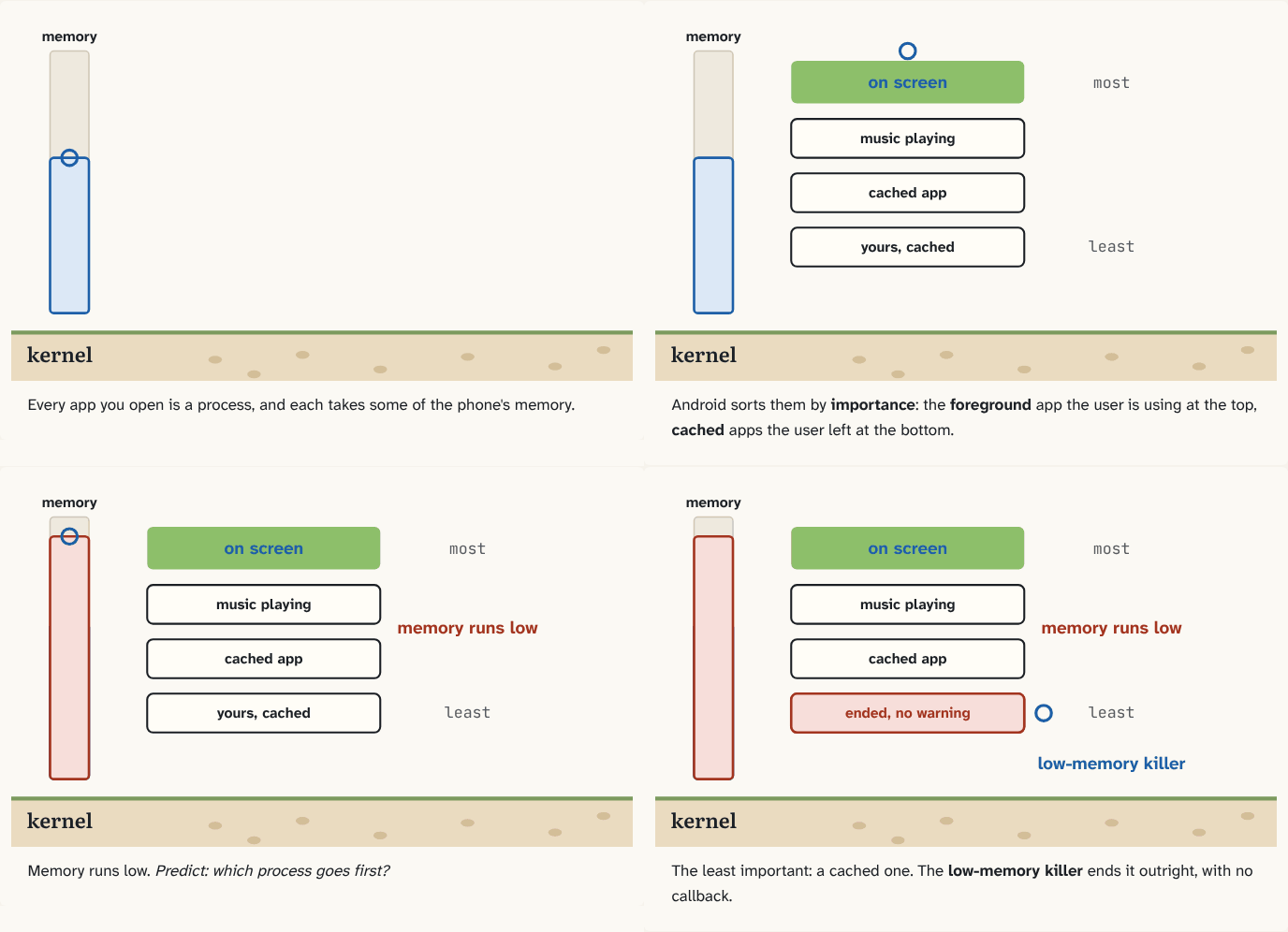
Every app you open is a process, and each takes some of the phone's memory.
Step 1 of 4Android sorts them by importance: the foreground app the user is using at the top, cached apps the user left at the bottom.
Step 2 of 4Memory runs low. Predict: which process goes first?
Step 3 of 4The least important: a cached one. The low-memory killer ends it outright, with no callback.
Step 4 of 4
The building block
Android sorts every app process by importance: how much the user would notice if it disappeared. At the top is the foreground process, the app the user is using right now. Below it are processes the user can still see or hear, like music playing. At the bottom are cached processes: apps the user left, kept in memory only so they open faster next time.
When free memory runs low, Android's low-memory killer ends processes to get memory back. It always starts with the least important: cached apps go first, the app on screen last. It doesn't ask your app; the kernel ends the process, and everything in its memory is gone at once.
That's why "my app is in the background" never means "my app is still running". Leaving an app makes it cached, and a cached process can disappear at any moment. Two later puzzles build on this: starting an app again from nothing (puzzle 14), and how a screen gets its state back after its process was ended (puzzle 22).
The analogy
A hotel with a fixed number of rooms. Guests who are in their rooms stay. Guests who checked out but left their bags are kept as long as there's space, so they can come back quickly. When a crowd arrives, the hotel clears those rooms first, oldest first, without calling anyone.
Check yourself
Sources
- Android Developers: Processes and app lifecycle ("A foreground process is one that is required for what the user is currently doing."; "A cached process is one that is not currently needed, so the system is free to kill it as needed when resources like memory are needed elsewhere.")
- Android Developers: Memory allocation among processes ("To decide which process to kill, LMK uses an \"out of memory\" score called oom_adj_score to prioritize the running processes. Processes with a high score are killed first. Background apps are first to be killed, and system processes are last to be killed.")
What you now know
When free memory runs low, Android's low-memory killer ends whole processes, starting with the least important. Importance comes from what the process is doing for the user: the app on screen matters most; cached apps in the background, which the user isn't using, go first. A process ended this way gets no warning.
Answer every question above correctly to unlock the next puzzle.
Something wrong or unclear on this page? Tell me: a puzzle that didn't click is a bug in the puzzle.