Mobile system design, from a packet to an app · Puzzle 6 · 7 of 11
The radio is the battery
Your app sends a tiny analytics ping every 20 seconds. Each is a few hundred bytes. Users report the app drains their battery. Here's why the size of a request has almost nothing to do with its cost.
The problem
Your app sends an analytics event the moment something happens, about every 20 seconds: a screen view, a tap, a scroll. Each is 300 bytes. Over an hour, that's a few hundred kilobytes, less than one photo. Yet the battery stats blame your app. How can so little data cost so much?
See it
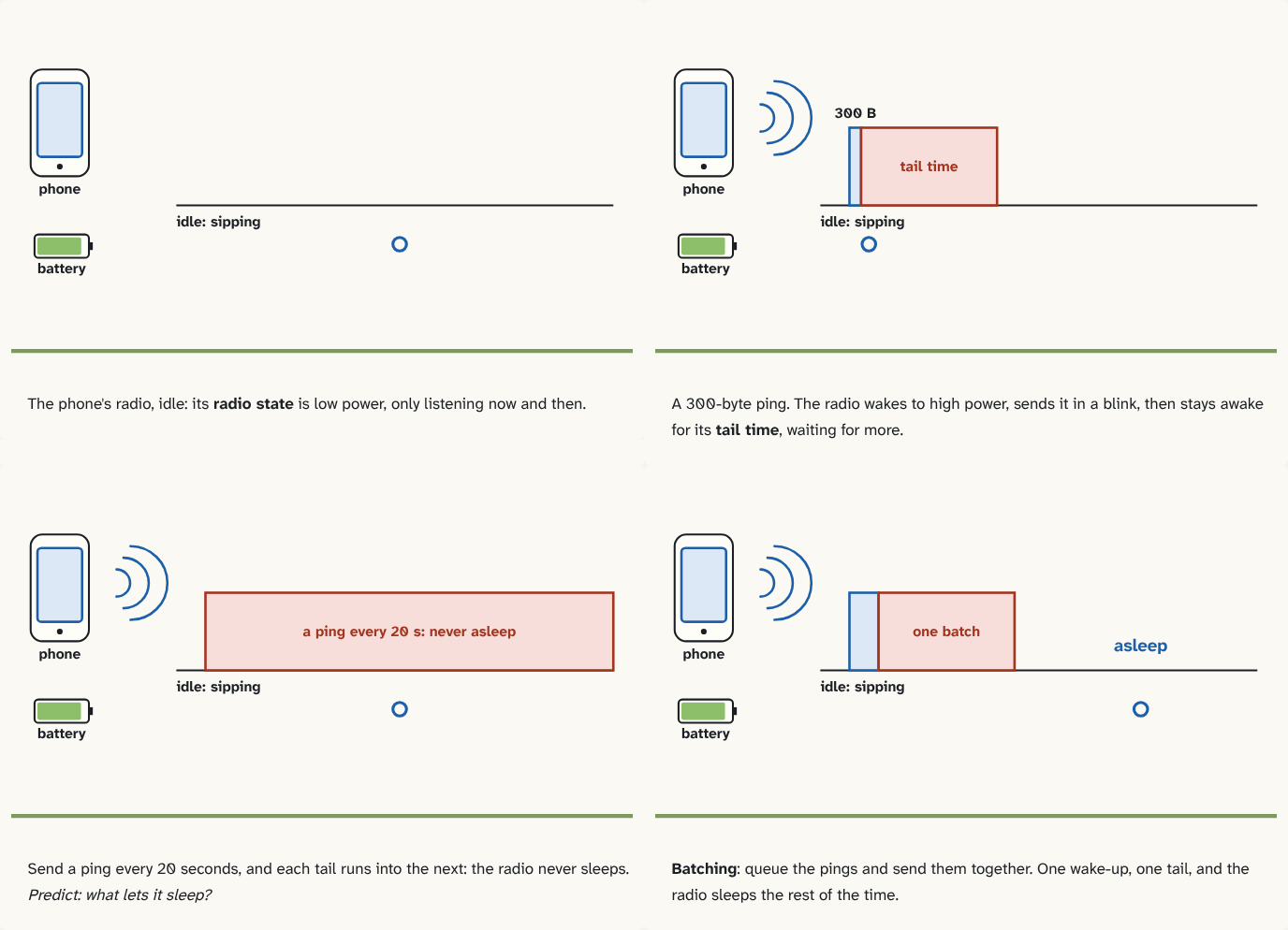
The phone's radio, idle: its radio state is low power, only listening now and then.
Step 1 of 4A 300-byte ping. The radio wakes to high power, sends it in a blink, then stays awake for its tail time, waiting for more.
Step 2 of 4Send a ping every 20 seconds, and each tail runs into the next: the radio never sleeps. Predict: what lets it sleep?
Step 3 of 4Batching: queue the pings and send them together. One wake-up, one tail, and the radio sleeps the rest of the time.
Step 4 of 4
The building block
The phone's cellular radio has power levels, its radio state. Idle, it sips power and only listens now and then. Active (the radio's own state, not puzzle 5's TCP connection, which can stay open while the radio idles), it draws a lot: on LTE, today's 4G mobile network, roughly a hundred times more, according to High Performance Browser Networking.
Two things make every send expensive:
- Waking up takes time, a wake-up delay. Moving from idle to connected costs control messages with the tower before your data can go: that's latency on top of puzzle 3's round trip.
- It doesn't fall asleep right away. After the last packet, the radio stays at high power for a tail time, in case more data comes, then steps down. Android's documentation gives an example for a typical device on 3G, the older mobile network: at least 18 seconds of drawing energy per transfer. On LTE the timers are set by the network and are shorter, but the effect is the same.
So a 300-byte ping pays almost the same fixed cost, one wake-up and one tail, as a far bigger download. Send a ping about every 20 seconds, and the radio never gets to sleep.
The fix is batching: queue small work and send it together, so the radio wakes once. Analytics go in a batch every few minutes, or ride along with a request the user is already waiting for. On Android, WorkManager can defer background sync to when the device is on Wi-Fi or charging.
The analogy
A car with a slow-starting engine that also idles for a while after every errand. Ten separate trips to the corner shop cost ten cold starts and ten idles. One trip with a shopping list costs one.
Check yourself
Sources
- High Performance Browser Networking: Mobile networks ("RRC Idle: Device radio is in a low-power state (<15 mW) and only listening to control traffic"; "RRC Connected: Device radio is in a high-power state (1000–3500 mW) while it either transmits data or waits for data")
- High Performance Browser Networking: Optimizing for mobile networks ("the mobile radio incurs a fixed power cost to cycle into the full power state, regardless of the amount of data to be transferred… there is no such thing as a 'small request' as far as the battery is concerned")
- Android Developers: Optimize network access ("for a typical 3G device, every data transfer session will cause the radio to draw energy for at least 18 seconds"; "if the same app bundled its data transfers… This would allow the radio to be on standby for 40 seconds of every minute")
What you now know
The phone's radio sleeps at low power and must wake to a high-power state to send anything, then stays there for a tail time waiting for more. So every network burst costs a fixed chunk of energy, whatever its size. Batching small transfers into fewer bursts lets the radio sleep; frequent tiny requests keep it awake.
Answer every question above correctly to unlock the next puzzle.
Something wrong or unclear on this page? Tell me: a puzzle that didn't click is a bug in the puzzle.