LLMs for mobile engineers, from tokens to your app · Puzzle 6 · 7 of 8
Your key is not a secret
The quickest way to ship an AI feature is to put the provider's key in the app and call the model directly. A week later the bill is ten times your users' usage. Here's why a key inside an APK isn't hidden, and the small backend that fixes it.
The problem
You put the model provider's key in BuildConfig, obfuscated with R8, Android's build tool that shrinks code and renames it, and call the API straight from the app. It works. Then your usage dashboard shows calls your app never made, around the clock, with prompts that have nothing to do with your feature. How did anyone get the key?
See it
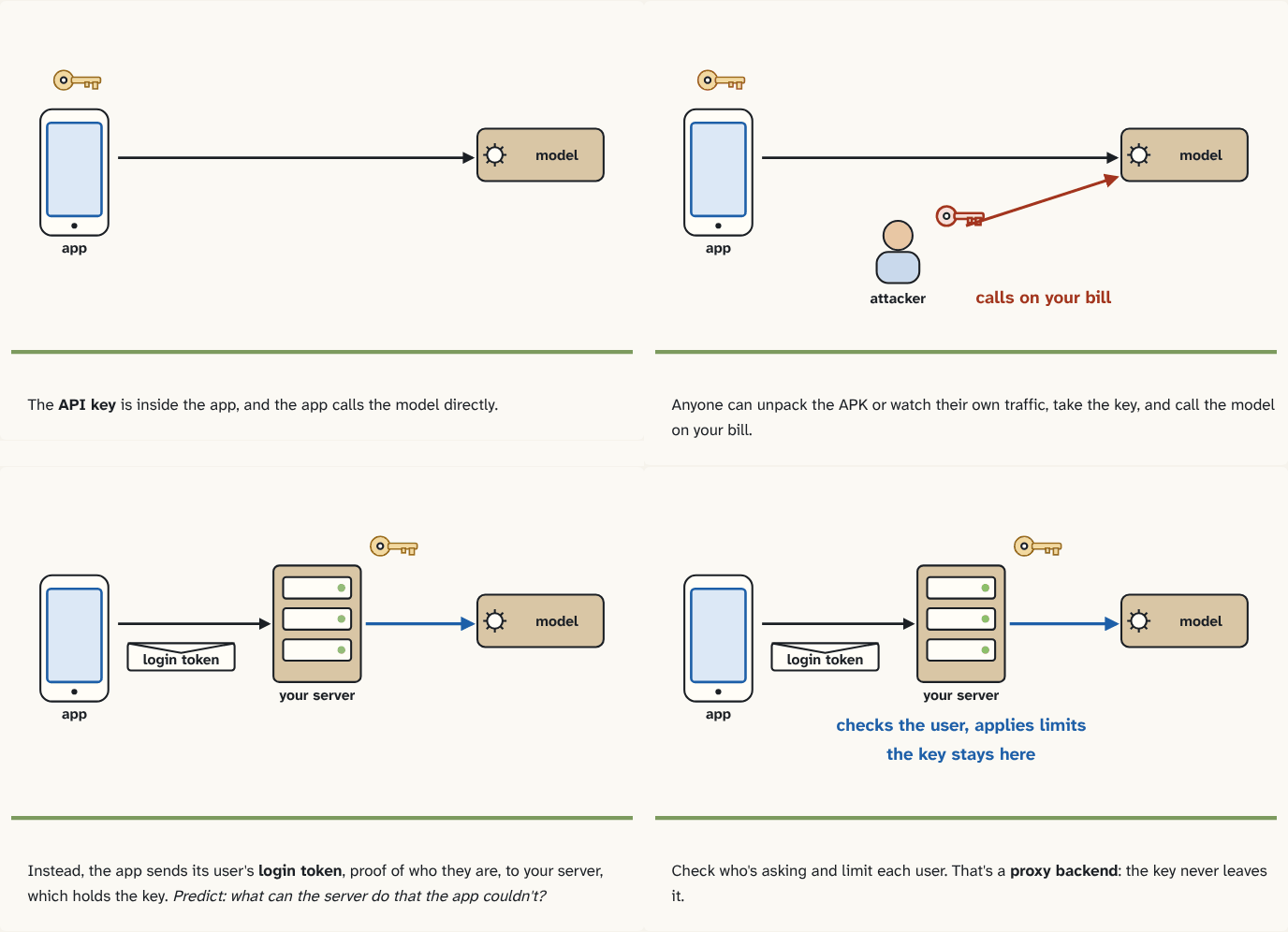
The API key is inside the app, and the app calls the model directly.
Step 1 of 4Anyone can unpack the APK or watch their own traffic, take the key, and call the model on your bill.
Step 2 of 4Instead, the app sends its user's login token, proof of who they are, to your server, which holds the key. Predict: what can the server do that the app couldn't?
Step 3 of 4Check who's asking and limit each user. That's a proxy backend: the key never leaves it.
Step 4 of 4
The building block
An API key is a password for your account: whoever sends it, gets served, and you get billed. And an APK is a file anyone can download and unpack. Strings in it can be found; obfuscation, scrambling names to make code harder to read, renames code but a key is still a string the app must send; and even if you hide it well, the key travels in every request from a phone the attacker controls, where they can intercept their own traffic. Google Cloud's guidance is plain: don't include API keys in client code.
So the key lives on a server you control, a proxy backend:
- The app calls your server, sending the user's login token: the token your app receives when the user signs in, which proves to your server who they are.
- Your server checks who it is, applies limits per user ("20 requests a day on the free plan"), and builds the request: your system prompt, the user's message.
- Your server adds the API key and calls the model, streaming the answer back to the app (puzzle 3).
The key never leaves the server. If one user abuses the feature, you block that user, not your whole account. And your instructions to the model and the model choice can change without an app release. Google offers a managed version of this pattern for Gemini: Firebase AI Logic, with App Check to make sure calls come from your real app.
The analogy
A company card. You don't hand the card to every customer and trust them to buy only what you meant. A cashier holds it, checks who's asking, applies the limit, and pays.
Check yourself
Sources
- Google Cloud: Best practices for managing API keys ("Don't include API keys in client code or commit them to code repositories. API keys hardcoded in the source code or stored in a repository are open to interception or theft by bad actors. The client should pass requests to the server, which can add the credential and issue the request.")
What you now know
Anything in your APK can be extracted, so an API key in the app belongs to anyone who downloads it, and they can spend your money. Call the model through a proxy backend: the app authenticates the user to your server, and the server adds the key, applies per-user limits and calls the model. The key never leaves the server.
Answer every question above correctly to unlock the next puzzle.
Something wrong or unclear on this page? Tell me: a puzzle that didn't click is a bug in the puzzle.