CoursesCompose Multiplatform, one screen from state to pixels
Puzzle 9 · 10 of 11
Which side hosts the other?
Put the shared bookmarks screen inside an existing iOS app's navigation, then put Apple's own text field inside the shared screen, and follow the search text both ways across the edge.
All puzzles in this course
The problem
Puzzle 6 showed where Compose's iOS code lives: Compose UI's iosMain holds the view controller that hosts a Compose screen. Now we use it. Our shared bookmarks screen already runs on Android. On iOS, the app's existing UIKit navigation, with its back button and title bar, must show it as one more screen. Inside that screen, the search box should be Apple's own UITextField, the native text field, so typing behaves exactly as in every other iOS app. So UIKit hosts Compose, and Compose hosts a piece of UIKit. And when the user types, or taps Clear, which side has to tell the other?
See it
Scroll sideways to see the full diagram.
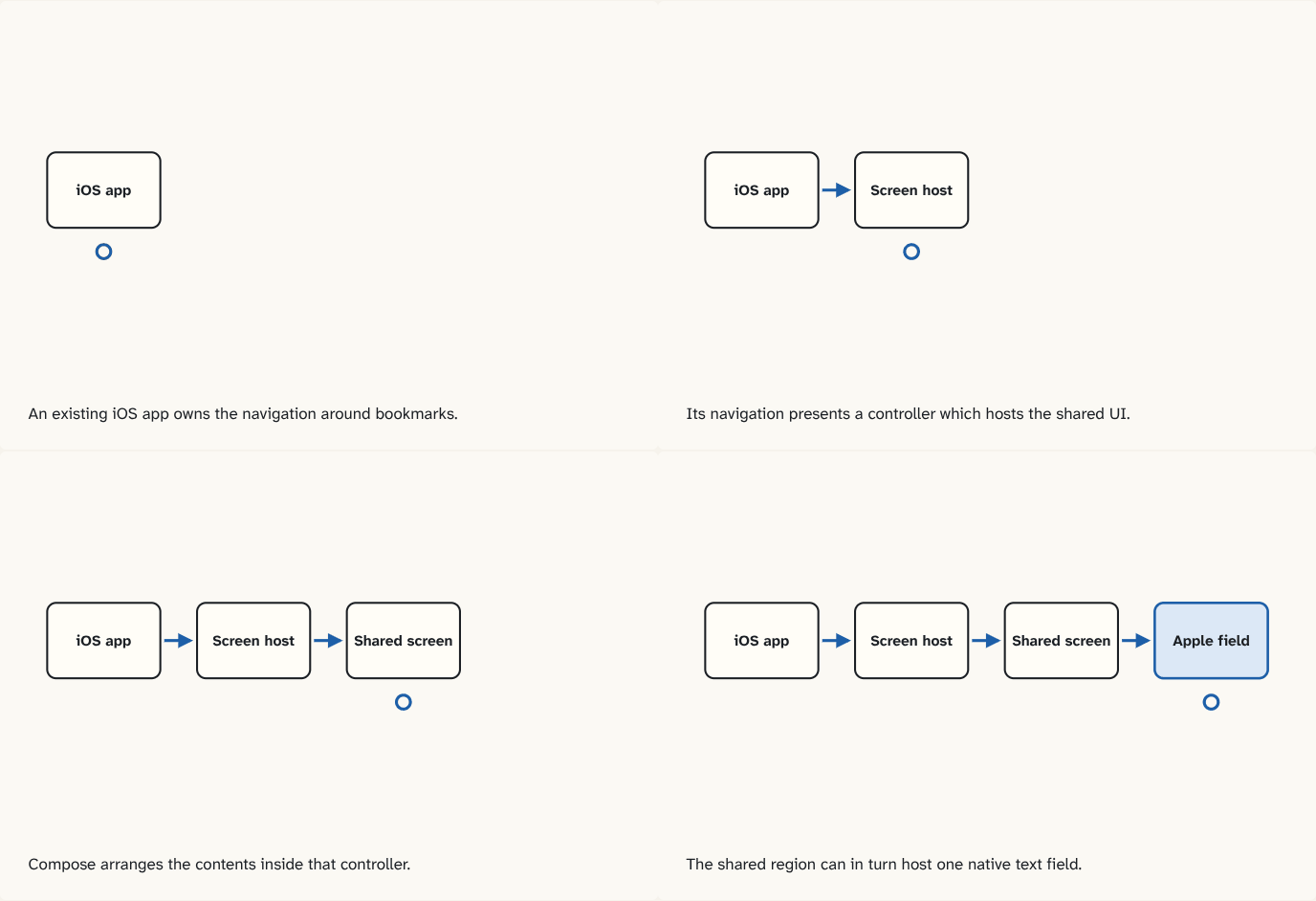
The app's own
UINavigationControllerowns the top: the back button and the title. UIKit decides where the next screen goes.Step 1 of 6Below the bar, the controller from
ComposeUIViewController: Compose draws everything here. That edge is a hosting boundary, UIKit outside and Compose inside.Step 2 of 6Inside Compose,
UIKitViewcuts out a region for Apple's ownUITextField: a second boundary, the other way round. Compose's snapshot statequeryholds the text.Step 3 of 6The user types "lake". UIKit calls
editingChanged, which writes the field's text intoquery: native to Compose.Step 4 of 6Now the user taps Compose's Clear button, which sets
query = "". Predict: which arrow reaches the field?Step 5 of 6update. It readquerythe last time it ran, so the write marks it, it runs again, and it empties the field: Compose to native.Step 6 of 6
The building block
A hosting boundary is where one UI system gives a region of the screen to another: the outer one decides where the region sits and how big it is; the inner one draws everything inside. This screen has two, in opposite directions.
UIKit hosts Compose. In the iOS source set, a Kotlin function wraps the shared screen in a view controller:
// iosMain, in a file named main.ios.kt
fun MainViewController(): UIViewController =
    ComposeUIViewController { BookmarksScreen() }
ComposeUIViewController takes a composable lambda, the start of the Composer's journey from puzzle 0, and returns a plain UIViewController. Swift sees the function under a generated name made from the file name, Main_iosKt, and uses the controller like any other:
let bookmarks = Main_iosKt.MainViewController()
navigationController.pushViewController(bookmarks, animated: true)
The UINavigationController, UIKit's controller for a stack of screens with a back button, owns the title bar and the back swipe. Everything below the bar is Compose's: composition, layout and drawing (puzzle 5) all happen inside that one controller. A SwiftUI app does the same through UIViewControllerRepresentable, a small Swift wrapper whose makeUIViewController returns Main_iosKt.MainViewController().
Compose hosts UIKit. Inside the shared screen, UIKitView cuts a region out of Compose's drawing and puts a real UIKit view there. It takes up to four things you'll use: factory creates the view, once, when the call first enters the composition; modifier sizes and places the region like any composable; update copies Compose state into the existing view; onRelease runs when the view leaves the composition for good, to clean up. Here is the search field, adapted from JetBrains' own example:
@OptIn(ExperimentalForeignApi::class)
@Composable
fun BookmarkSearch() {
    var query by remember { mutableStateOf("") }
    Column {
        UIKitView(
            factory = {
                val field = object : UITextField(CGRectMake(0.0, 0.0, 0.0, 0.0)) {
                    @ObjCAction
                    fun editingChanged() {
                        query = text ?: ""                  // native → Compose
                    }
                }
                field.addTarget(
                    target = field,
                    action = NSSelectorFromString(field::editingChanged.name),
                    forControlEvents = UIControlEventEditingChanged,
                )
                field
            },
            modifier = Modifier.fillMaxWidth().height(44.dp),
            update = { field ->
                if (field.text != query) field.text = query  // Compose → native
            },
            onRelease = { field -> field.resignFirstResponder() },
        )
        Button(onClick = { query = "" }) { Text("Clear") }
    }
}
Follow the text both ways.
Typing. UIKit reports edits the Objective-C way: addTarget tells the field to call a method by name whenever its text changes (the event UIControlEventEditingChanged). @ObjCAction makes the Kotlin function editingChanged callable that way, from Objective-C (the KMP course, puzzle 5). It writes the field's text into query, which is snapshot state, so everything that read query is marked (puzzle 3).
Clear. The button writes query = "". Nothing in UIKit knows. The field only changes because update read query the last time it ran: UIKitView's own documentation says update is "invoked once initially and then every time the state it reads changes". It's the same rule as a composable that read state, applied to a callback. So the write marks update, it runs, and it sets the field's text to "". The if stops it writing the same text back into the field while the user is typing.
Leave out update, or read query somewhere else, and Clear empties the state but the field keeps showing the old text: the two sides disagree. A field that only ever reports to Compose needs no update; one that Compose can also change needs both directions.
onRelease here hides the keyboard if the field still had it when the screen leaves. Release anything the view started (a timer, an observer, a playing video) the same way.
Go deeperWhy not create the field outside and pass it in?
You build the UITextField in a remember { } and return it from factory. Why does the documentation warn against that?
The view's lifetime belongs to UIKitView: it creates the view with factory, and releases it with onRelease when the call leaves the composition. The source's own comment: "T shouldn't be leaked outside and will be managed by Compose runtime efficiently. Remembering T externally and passing it to be returned from factory can (and probably will) lead to hilarious bugs in case onReset is not null." onReset is a fifth parameter that lets Compose reuse the same view for another item, in lazy lists for example; a view also held elsewhere would then be shared by two owners.
The analogy
Our company's play is a guest in another theatre: the theatre's own stage manager (the navigation controller) decides when our play is on and keeps the curtain and the exit signs; inside our time slot, our crew runs everything (Compose). One scene uses a real piece of the host theatre's machinery, a working lift (the native field). We built the set around it, but the lift has its own controls: it rings our bell when someone rides it (editingChanged), and when the script changes, our crew sends it to the right floor (update).
Check yourself
Sources
- Kotlin docs: Integration with the UIKit framework ("To use Compose Multiplatform inside a UIKit application, add your Compose Multiplatform code to any container view controller."; "UINavigationController(rootViewController: composeViewController)"; "To use UIKit elements inside Compose Multiplatform, add the UIKit elements that you want to use to a UIKitView from Compose Multiplatform."; "The editingChanged() function is annotated with @ObjCAction so that it can interoperate with Objective-C code."; "The action parameter of the addTarget() function passes the name of the editingChanged() function, triggering it in response to a UIControlEventEditingChanged event."; "The update parameter of UIKitView() is called when the observable message state changes its value."; "The function updates the text attribute of the UITextField so that the user sees the updated value.")
- Kotlin docs: Integration with the SwiftUI framework ("fun MainViewController(): UIViewController = ComposeUIViewController { … }"; "ComposeUIViewController() is a Compose Multiplatform library function that accepts a composable function as the content argument."; "struct ComposeViewController: UIViewControllerRepresentable { func makeUIViewController(context: Context) -> UIViewController { return Main_iosKt.MainViewController() } … }"; "Main_iosKt.MainViewController is a generated name.")
- Compose Multiplatform source: UIKitView.ios.kt ("Compose a [UIView] of class [T] into the UI hierarchy."; "@param update A callback to be invoked every time the state it reads changes. Invoked once initially and then every time the state it reads changes."; "@param onRelease A callback invoked as a signal that the [T] has exited the composition forever. Use it to release resources and stop jobs associated with [T]."; "[T] shouldn't be leaked outside and will be managed by Compose runtime efficiently.";
fun <T : UIView> UIKitView(factory: () -> T, modifier: Modifier = Modifier, update: (T) -> Unit = NoOp, onRelease: (T) -> Unit = NoOp, onReset: ((T) -> Unit)? = null, properties: UIKitInteropProperties = UIKitInteropProperties.Default)) - Compose Multiplatform source: ComposeUIViewController.ios.kt (
fun ComposeUIViewController(content: @Composable () -> Unit): UIViewController)
What you now know
Going one way, a Kotlin function returns ComposeUIViewController { … }, and Swift pushes that controller like any other; Compose draws the whole screen inside it. Going the other way, UIKitView puts a UIKit view into a composable: factory creates it once, update copies state into it and runs again whenever the state it read changes, and onRelease cleans up. User edits come back through a native callback that writes the state.
Answer every question above correctly to unlock the next puzzle.
Something wrong or unclear on this page? Tell me: a puzzle that didn't click is a bug in the puzzle.