Bluetooth Low Energy, from the radio up · Puzzle 4 · 5 of 5
Don't ask, get told
In puzzle 3, the phone read the heart rate by asking for it. Asking again and again wastes radio time. Here's how the strap tells the phone instead, and the one step everyone forgets.
The problem
In puzzle 3, the phone read the heart rate by asking: "read 2A37". To show a live heart rate, it would have to ask at every connection event. That's a request and an answer each time, even when the value didn't change, and each read waits for a meeting to ask and for the answer (puzzle 3), so the value can be old by the time it arrives. Can the strap just tell the phone when the value changes?
See it
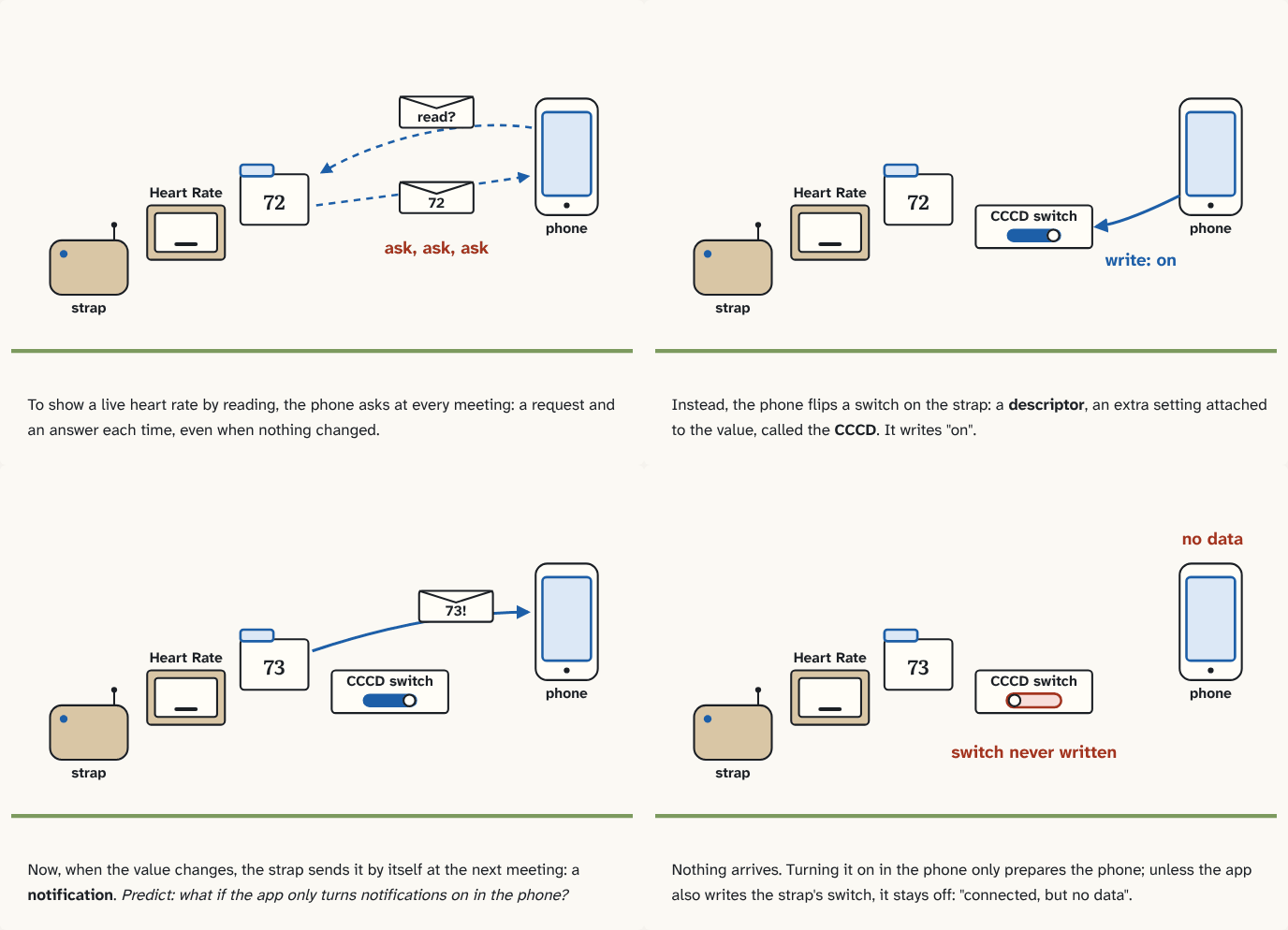
To show a live heart rate by reading, the phone asks at every meeting: a request and an answer each time, even when nothing changed.
Step 1 of 4Instead, the phone flips a switch on the strap: a descriptor, an extra setting attached to the value, called the CCCD. It writes "on".
Step 2 of 4Now, when the value changes, the strap sends it by itself at the next meeting: a notification. Predict: what if the app only turns notifications on in the phone?
Step 3 of 4Nothing arrives. Turning it on in the phone only prepares the phone; unless the app also writes the strap's switch, it stays off: "connected, but no data".
Step 4 of 4
The building block
Yes: that's a notification. The GATT server sends a characteristic's new value by itself at the next connection event, without being asked. The meetings still happen; what's saved is the request and answer packets, and the value arrives as soon as it changes.
But the strap doesn't notify everyone by default. A characteristic can carry extra settings called descriptors. Descriptors have UUIDs too, and a client can write them. One of them, the CCCD (Client Characteristic Configuration Descriptor, UUID 2902), holds a switch per client: bit 0 on means "notify me". The client turns notifications on by writing that descriptor on the device.
On Android, your app gets a BluetoothGatt object when it connects: Android's handle for that connection's GATT client. After service discovery you find the characteristic by its UUIDs. Then turning notifications on takes two separate steps: setCharacteristicNotification() on the phone, and writeDescriptor() to the strap. A short UUID like 2902 is written in full as Bluetooth's standard base number with those four digits in it, which is the long string in the code.
val characteristic = gatt.getService(HEART_RATE).getCharacteristic(MEASUREMENT)   // HEART_RATE and MEASUREMENT: your UUID constants
gatt.setCharacteristicNotification(characteristic, true)   // 1. on the phone: pass these to my app
val cccd = characteristic.getDescriptor(UUID.fromString("00002902-0000-1000-8000-00805f9b34fb"))   // 2902, written in full
gatt.writeDescriptor(cccd, BluetoothGattDescriptor.ENABLE_NOTIFICATION_VALUE)   // 2. on the strap: bit 0 on
setCharacteristicNotification() only tells your own phone to hand this characteristic's notifications to your app. It sends nothing to the strap. writeDescriptor() is what flips the switch on the strap. Skip it, and the strap never sends a thing: the classic "connected, but no data" bug.
The analogy
Instead of phoning the newsroom every hour to ask "anything new?", you subscribe. But the subscription has two halves: you tell your own mailbox to accept the paper, and you send the form to the newspaper. Do only the first, and your mailbox waits forever.
Check yourself
Sources
- Bluetooth Core Specification 5.4, Vol 3, Part G: GATT (Client Characteristic Configuration: "Bit 0: Notification. The Characteristic Value shall be notified"; the descriptor value is kept per client)
- Bluetooth SIG assigned numbers: descriptors (
0x2902: Client Characteristic Configuration) - Android Developers: Transfer BLE data (the sample calls
setCharacteristicNotification()and then writes the descriptor withENABLE_NOTIFICATION_VALUE)
What you now know
A notification is the server sending a characteristic's value by itself when it changes. It only starts after the client writes the CCCD descriptor on the device. On Android, setCharacteristicNotification() alone isn't enough: you also writeDescriptor() the CCCD.
Answer every question above correctly to unlock the next puzzle.
That's everything published so far
You've reached the last puzzle of Bluetooth Low Energy, from the radio up. Next: Module 2: Making it fast and reliable, about why only 20 bytes per packet (MTU, Data Length Extension, 2M PHY), throughput math, Android's one-operation-at-a-time rule and status 133.
New puzzles are announced on LinkedIn and in the learning log feed.
Something wrong or unclear on this page? Tell me: a puzzle that didn't click is a bug in the puzzle.