Android from the foundation · Puzzle 6 of 6
The main thread is one clerk with one queue
All UI and lifecycle code runs on one thread that takes messages from a queue, one at a time. A slow message blocks everything behind it.
The problem
In puzzle 5, a Binder thread picked up the town hall's letter. But your screens can't be touched from just any thread. Android's UI code isn't thread-safe: if two threads changed the same view at the same moment, it could end up broken. So every UI change and every lifecycle letter has to end up on one thread, in order.
See it
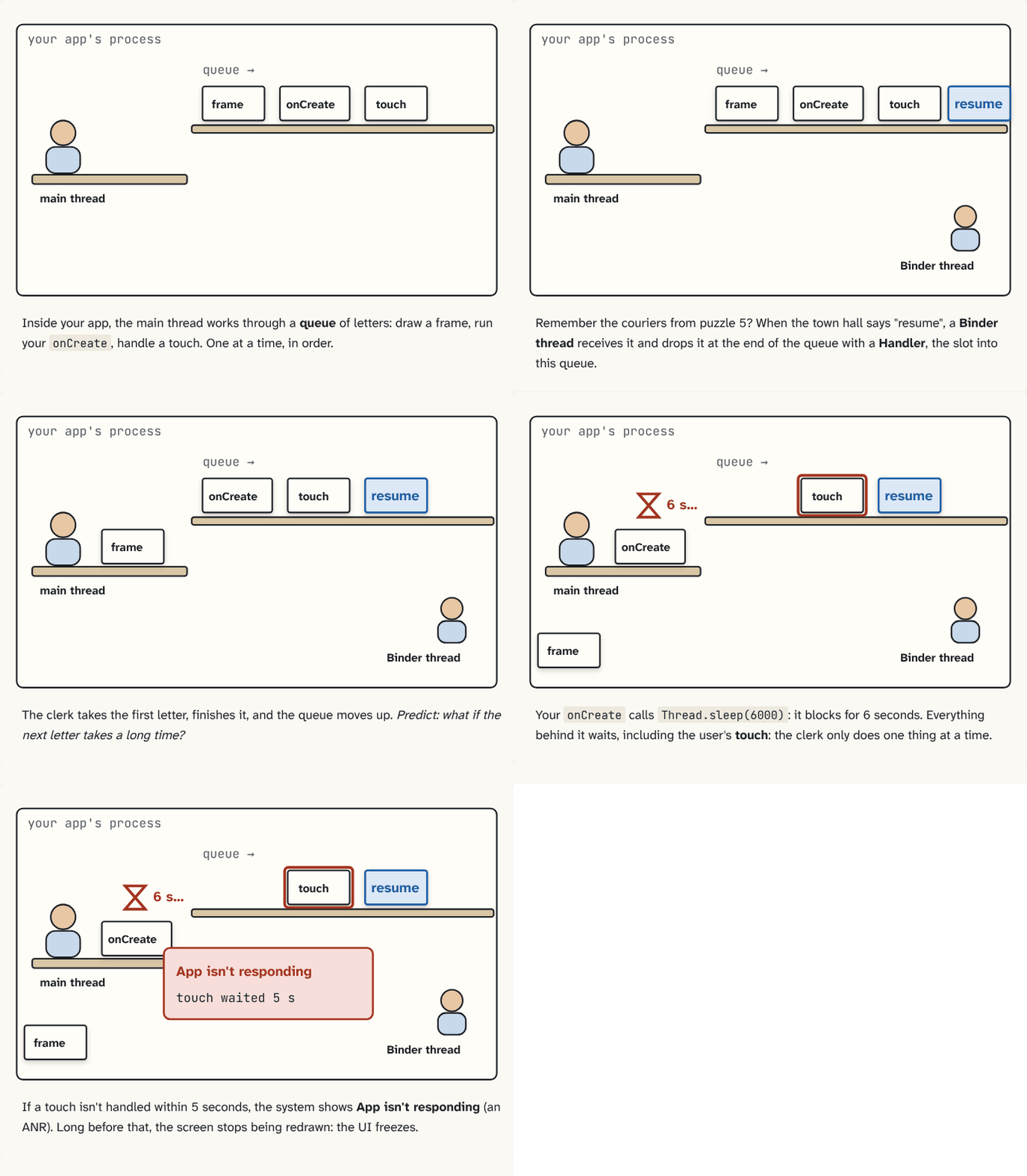
Inside your app, the main thread works through a queue of letters: draw a frame, run your
onCreate, handle a touch. One at a time, in order.Step 1 of 5Remember the couriers from puzzle 5? When the town hall says "resume", a Binder thread receives it and drops it at the end of the queue with a Handler, the slot into this queue.
Step 2 of 5The clerk takes the first letter, finishes it, and the queue moves up. Predict: what if the next letter takes a long time?
Step 3 of 5Your
onCreatecallsThread.sleep(6000): it blocks for 6 seconds. Everything behind it waits, including the user's touch: the clerk only does one thing at a time.Step 4 of 5If a touch isn't handled within 5 seconds, the system shows App isn't responding (an ANR). Long before that, the screen stops being redrawn: the UI freezes.
Step 5 of 5
The building block
Inside your process:
MessageQueueWhen nothing is due, the queue sleeps in native code until a message arrives or a timer fires. 387 nativePollOnce(ptr, nextPollTimeoutMillis);MessageQueue.java, line 387 · AOSP frameworks/base ↗: the queue of messages ("run this"), sorted by when they should run.- Looper:
Looper.loop()The main thread's endless loop: take one message, run it, repeat. 304 public static void loop() { … 327 for (;;) { 328 if (!loopOnce(me, ident, thresholdOverride)) { 329 return; 330 } 331 }Looper.java, line 304 · AOSP frameworks/base ↗ is an endless loop on one thread: take the next message, run it, repeat; sleep when the queue is empty. - Handler: the slot that puts a message into one Looper's queue.
handler.post { … }post() wraps your code in a Message and puts it in this Handler's queue. 438 public final boolean post(@NonNull Runnable r) { 439 return sendMessageDelayed(getPostMessage(r), 0); 440 } … 782 private boolean enqueueMessage(@NonNull MessageQueue queue, @NonNull Message msg, 783 long uptimeMillis) { 784 msg.target = this; … 789 }Handler.java, line 438 · AOSP frameworks/base ↗ drops your code in as a letter.
val main = Handler(Looper.getMainLooper())
main.post { textView.text = "Done" }        // runs when the clerk reaches it
main.postDelayed({ hideHint() }, 2_000)     // runs about 2 s later
Every app process starts in ActivityThread.main()The real entry point of every app process: it prepares the main Looper, says hello to system_server, then loops forever. 8907 public static void main(String[] args) {
…
8927 Looper.prepareMainLooper();
…
8943 thread.attach(false, startSeq);
…
8956 Looper.loop();ActivityThread.java, line 8907 · AOSP frameworks/base ↗, which prepares this loop for the main thread and runs it forever.
The screen is redrawn about every 16 ms (60 times a second), and each redraw is also a message in this queue. If a message takes longer, frames are skipped and the app stutters ("jank"). If a touch waits 5 seconds, the system shows an ANR dialog: Application Not Responding.
In puzzle 0 the letter seemed to go straight into the clerk's tray. Now you know the real hand-off: a Binder thread receives it and posts it with a Handler.
The analogy
One clerk at a desk with an in-tray. The clerk takes one letter at a time and finishes it before the next. Anyone, including the post office's couriers, can drop letters in through the slot (a Handler).
Check yourself
Sources
What you now know
The full chain: system_server decides → Binder carries the letter → a Binder thread posts it with a Handler → the main thread's Looper runs it → your code. Keep every main-thread message short.
Answer every question above correctly to unlock the next puzzle.