CoursesCompose Multiplatform, one screen from state to pixels
Puzzle 8 · 9 of 11
Which work does a moving card need?
Move the shared card as the user scrolls. Defer the read once more, this time to a later phase, and predict which work a frame can reuse.
All puzzles in this course
The problem
Puzzle 7 deferred a read from a parent into the child that needs the value. Now a card on the same screen slides down as you scroll. Its text and size stay the same; only its position changes, on every frame of the scroll. Running composition for each of those frames is work nobody sees. Can the read move somewhere cheaper than composition?
See it
Scroll sideways to see the full diagram.
First version:
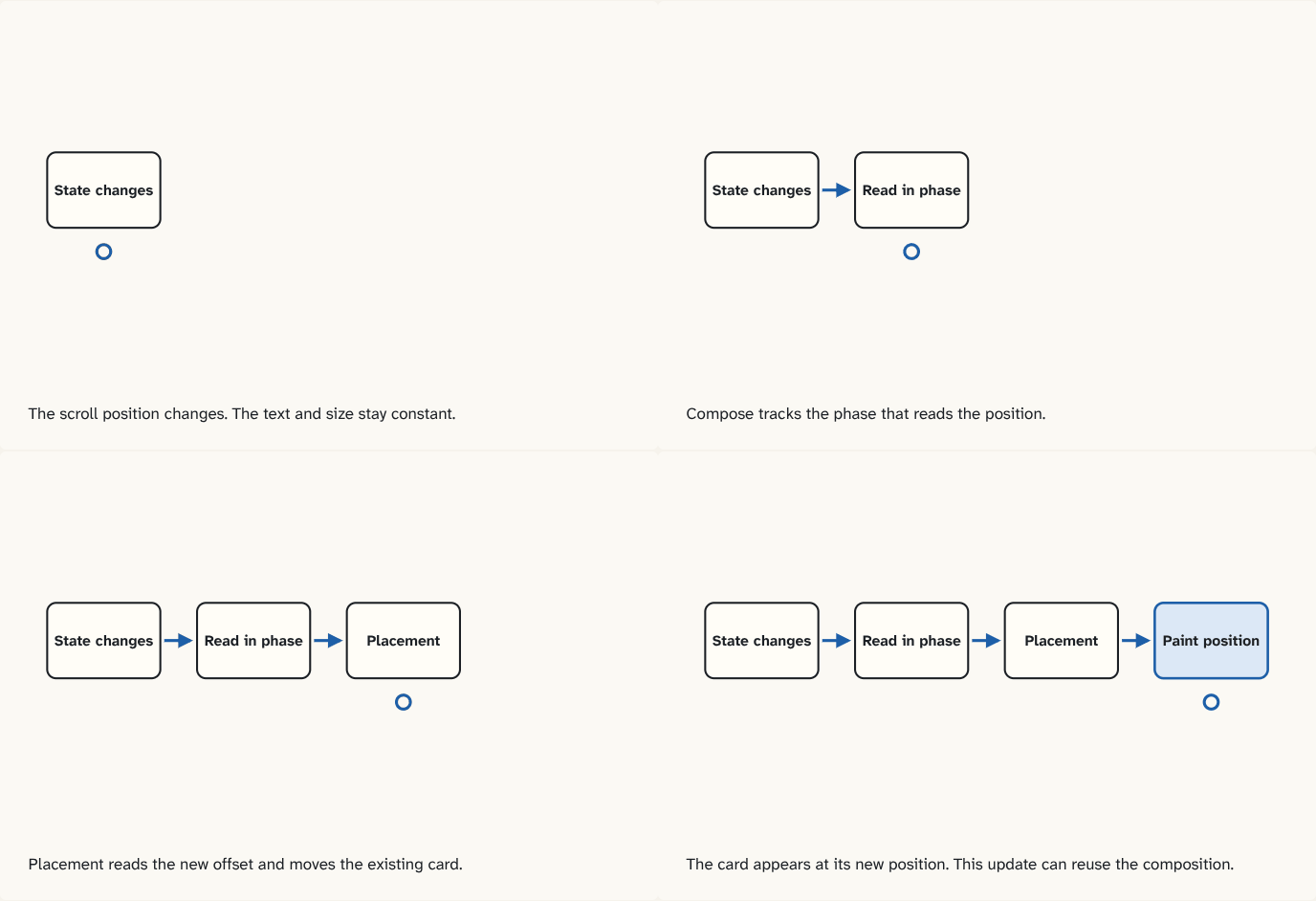
val y = position.valueat the top of the composable, thenygoes into the offset lambda. The read happens in composition.Step 1 of 4A scroll changes the position. Composition is marked: the composable runs again, then the card is placed and drawn again. All that to move one card of the same size.
Step 2 of 4Second version: read
position.valueinside the offset lambda, which Compose calls during placement. The read moves down to layout. Predict: which work runs on the next scroll?Step 3 of 4Only placement, and the frame shows the card further down. Composition and the card's measured size are reused: the read was deferred to a later phase.
Step 4 of 4
The building block
Puzzle 5 split every frame into three phases: composition, layout (measure, then place) and drawing. Puzzle 3's state reads are noted per phase: Compose records which phase was running when the value was read, and a change reruns that phase, and then only the later work its result needs.
The first version reads the position at the top of the composable. The position is an integer number of pixels:
val y = position.value                       // read in composition
Box(modifier = Modifier.offset { IntOffset(x = 0, y = y) }) {
    Text("Saved item")
}
position.value is evaluated while the composable runs, so the read belongs to composition. Every scroll step marks composition: the composable runs again and builds a new offset, then the card is placed and drawn again in its new spot. Its size didn't change, so measuring can be reused: Android's docs say that after composition, Compose UI "might skip these phases if the content remains the same and the size and the layout won't change". Still, the whole composable ran just to move a card.
The second version reads it inside the lambda that Modifier.offset { } takes. Compose calls that lambda during placement, so that's where the read happens:
Box(modifier = Modifier.offset { IntOffset(x = 0, y = position.value) }) {  // read in placement
    Text("Saved item")
}
Now a scroll step reruns placement, and the frame shows the card in its new spot. Composition doesn't run, and measuring doesn't either: Android's docs note that measuring and placing are tracked separately ("separate restart scopes", the same idea as puzzle 3's restart groups, applied to layout), so a read during placement doesn't redo the measuring before it. The docs add a caveat: the two steps "are often intertwined", so a placement read can still affect measuring in layouts where one depends on the other. And placement can only move things: if the value also changed the card's height, the card would have to be measured again, and the items under it placed again. It's the same idea as puzzle 7, deferring a read, but to a later phase instead of a smaller group.
The same works one phase further. If a value only changes paint, such as a background colour that follows the scroll, read it inside a drawing lambda:
Box(modifier = Modifier.drawBehind { drawRect(color.value) })drawBehind runs its lambda while drawing, so a change of colour reruns drawing alone. Choose the phase by the work your value actually drives.
Go deeperMove versus measure
Why might a card changing its height need more work than a card moving down?
A different height needs the card measured again, and its parent may then move the items below it. Moving a card of the same size reuses its measured size and only places it again.
The analogy
The theatre once more. If the stage manager rewrites the script every time a prop must slide a little further across the stage, rehearsals never end. The tape marks on the floor (placement) can move without touching the script, and a change of light colour (drawing) needs neither the script nor the tape.
Check yourself
Sources
- Android Developers: Jetpack Compose phases ("When you read the value of a snapshot state during one of the phases listed previously, Compose automatically tracks what it was doing when it read the value."; "Key Point: The measurement step and the placement step have separate restart scopes, meaning that state reads in the placement step don't re-invoke the measurement step before that. However, these two steps are often intertwined, so a state read in the placement step can affect other restart scopes that belong to the measurement step."; "Depending on the result of composition, Compose UI runs the layout and drawing phases. It might skip these phases if the content remains the same and the size and the layout won't change."; "It also runs the drawing phase if size or position has changed."; "When the state's value changes, Compose UI runs only the draw phase."; "The value of firstVisibleItemScrollOffset changes every frame during scroll, and by deferring the state read to the layout phase, you can avoid recompositions all along.")
- Android Developers: Follow best practices ("By switching to the lambda version of the modifier, you can make sure the function reads the scroll state in the layout phase."; "To improve this, use a lambda-based modifier—in this case, drawBehind.")
What you now know
A state read is noted in the phase that makes it. Read a scroll position at the top of a composable and every change runs composition, then places and draws the card again. Read it inside the offset lambda, which runs during placement, and a change only places the card again: composition and measuring are reused. A value that only changes paint, read inside a drawing lambda, reruns drawing alone.
Answer every question above correctly to unlock the next puzzle.
Something wrong or unclear on this page? Tell me: a puzzle that didn't click is a bug in the puzzle.